A practical, step-by-step guide for architects developing early-stage building concepts with Arcadium 3D.
Architectural concept design begins long before a project is ready for construction drawings. An architect may have a client brief, an existing property survey and a collection of initial ideas, but still need to test how rooms connect, how the building sits on its site and whether the proposed form makes sense from inside and outside. The challenge is turning those ideas into a design that can be examined, discussed and revised.
This guide explains the architectural concept design process and then walks through a two-story residential example in Arcadium 3D. It covers measured walls, existing-plan references, doors, windows, multiple levels, stairs, materials, viewing modes, AI visualization, client presentations and handoff. The example is illustrative rather than a claim about a completed client project. Arcadium is used here as a concept-modeling and communication tool—not as an automatic substitute for site surveys, engineering, BIM coordination or construction documentation.
Quick start: If you already have a measured floor plan, jump to “Step 2: Import a plan or begin from scratch.” Otherwise, begin with the brief and site constraints so the model represents a meaningful architectural proposal.
What Is Architectural Concept Design?
Architectural concept design is the stage when a project’s requirements become a coherent spatial and visual idea. It connects a client’s goals with decisions about building size, form, organization, circulation, orientation and architectural character. The resulting concept may be communicated through sketches, floor plans, massing studies, perspective views, early elevations, sections and explanatory notes. Not all projects need the same set of deliverables.
An effective concept does more than look appealing. It should explain why the spaces are arranged as proposed and make the most important trade-offs visible. For a home addition, that might mean balancing a larger kitchen with backyard access, natural light and the cost of removing existing walls. For a small office, it might mean testing privacy against open-plan collaboration.
Architectural concept design versus schematic design
The terms overlap, and firms use them differently. In common US practice, schematic design develops project goals and requirements into studies showing scale, form and spatial relationships for the owner’s review. The American Institute of Architects describes schematic deliverables as potentially including plans, sections, elevations, models and renderings, with the precise scope established by the project agreement. Concept exploration may begin before—or form part of—that schematic work. Design development and construction documents then introduce substantially more coordinated technical information.
That difference matters when using 3D modeling software: a persuasive concept image does not by itself establish code compliance, structural feasibility or buildable detailing.
What should an architectural design concept include?
A concise statement of the design goals and the user groups the building must serve.
Known site conditions, existing dimensions, access, orientation and assumptions requiring verification.
Preliminary floor plans showing major spaces and circulation.
Overall building form or massing, with representative elevations and sections when useful.
Early material and facade directions, rather than finalized product specifications.
A selection of 3D views or an interactive model to make spatial relationships understandable.
A short record of alternatives, decisions, open questions and next technical checks.
What Makes an Architectural Concept Strong?
A strong concept is a decision-making framework, not simply an architectural style. “Modern,” “minimal” or “industrial” can describe the appearance of a building without explaining how the building should work. An actionable concept makes decisions about where spaces belong, what the building prioritizes and how the proposal responds to actual conditions. For a family home, “connect everyday living to the garden while shielding bedrooms from the street” is more useful than “create a contemporary home”: it suggests a ground-floor living area facing the yard, controlled street-facing openings and quieter upstairs sleeping spaces.
The organizing idea should survive several tests. Can the team point to a decision in the plan that follows from it? Does it help resolve a conflict between two requirements? Can it be communicated clearly to the client? Is there evidence that the site and project budget make the idea worth developing? If not, the concept may be an attractive description rather than a working design direction.
How Architects Develop a Concept From Scratch
Identify the problem behind the brief
Translate requests into outcomes. A client who asks for “an open kitchen” might want supervision of children, easy entertaining or more daylight. Those aims could require different layouts. Ask which activities happen together, which should be separated, and what currently makes the building difficult to use. Distinguish mandatory needs from ambitions that can be traded off when conflicts arise.
Investigate precedents without copying their appearance
Look for buildings that respond to comparable briefs or sites. Study how they arrange public and private areas, form entrances, bring light into deep plans or integrate additions with existing structures. Record the underlying design moves, not only facade imagery. A courtyard precedent may demonstrate an effective daylight and privacy strategy even if its materials are unsuitable for the current project.
Express the organizing idea before developing detail
Sketch alternative relationships between major spaces and outside areas, then write a concise design proposition for each. For the illustrative home, one proposition might be a compact volume with an open garden-facing ground floor; another might be a stepped volume that creates a sheltered outdoor edge. Test both against circulation, privacy, building footprint and construction complexity. Do not resolve tile finishes or interior decor while the building's organization is still unsettled.
Use the right kind of early diagram
A parti diagram shows the central organizing idea: for example, a central courtyard surrounded by occupied rooms or a circulation spine linking two wings. A bubble diagram tests desired proximity between functions without exact dimensions. A concept sketch explores physical arrangement and architectural character. A massing study compares simplified three-dimensional building volumes. These are complementary tools, not successive levels of the same drawing. Move between them when a decision needs a different kind of evidence.
Different Starting Points for an Architectural Concept
Site-driven design
A narrow lot, irregular boundary or prominent neighboring building can suggest the building's overall placement and shape. On a sloping lot, an architect might test split levels to reduce the apparent scale from the street, but should investigate survey levels, access, drainage and structural implications before advancing the idea. A site-driven concept needs a clear explanation of which conditions it addresses and which remain unresolved.
Spatial and functional design
A spatial concept begins with relationships: rooms around a courtyard, a central shared area, or an entrance sequence moving from public to private. A functional concept begins with activities and users. In a small office, quiet workspaces may need separation from meeting rooms and deliveries. In a home, proximity between kitchen and dining may be more important than symmetry on the facade. These organizing ideas can be tested with adjacency diagrams and preliminary plans.
Environmental and contextual design
Daylight access, prevailing winds and neighborhood scale can guide form and opening placement. For example, an architect may test whether the building can admit useful daylight while limiting unwanted summer heat and overlooking from neighboring windows. The right response depends on climate, orientation, surrounding obstructions and intended use; it cannot be prescribed using a universal compass direction.
Material-led and adaptive-reuse concepts
Sometimes an existing brick structure, timber framing or valuable facade establishes the design's character and constrains the intervention. Alternatively, the concept may be organized around a particular structural expression. The architect still needs to investigate condition, buildability, maintenance and cost. Materials should inform form and space, not simply be overlaid on a finished model. Most real projects combine site, functional, environmental and contextual drivers rather than fitting one category.
The Concept Design Process Before You Open the Software
1. Translate the client brief into priorities
Begin with intended use, approximate space requirements, key adjacencies, accessibility needs, budget expectations and nonnegotiable requirements. Separate essential functions from preferences. For example, a household might require three bedrooms but accept several kitchen arrangements. This distinction gives the architect something to test rather than merely a list of rooms to draw.
2. Gather reliable site and existing-building information
For renovation or addition work, obtain measured existing conditions and check which walls, floor levels and openings are actually present. For a new building, review property information, local zoning and setbacks, site access, topography, orientation and relevant constraints. Concept modeling helps visualize options, but it cannot independently verify land boundaries, utilities, soils, structural capacity or local approvals.
3. Work from the largest decisions to the smallest
Start with approximate building volume and location, then arrange spaces and circulation, then consider openings, stairs and exterior treatment. Resist the temptation to add detailed furniture and photorealistic finishes before understanding whether the core layout works. A useful sequence is: brief → site/context → massing → plan → three-dimensional review → alternatives → client presentation.
4. Establish what will count as a successful concept
Record measurable or observable criteria: required room count, suitable access, acceptable circulation, compatibility with known constraints and a credible project budget direction. Use those criteria during reviews. They also help a client comment on the design itself instead of reacting only to its rendering style.
Architectural Site Analysis: Turning Observations Into Design Decisions
A site analysis is not merely a list of constraints for the eventual permit application. It should help the designer decide what is possible, where the building ought to sit and what the scheme needs to resolve. Begin with reliable boundary and topographic information, existing conditions and the applicable local development controls. Identify which measurements and conditions are verified and which are provisional. An image downloaded from an online map is useful context but does not replace a measured survey.
Orientation, seasonal sun and neighborhood conditions
Record true north and consider the sun at different times of year, adjacent buildings, existing trees and likely shadow patterns. The same glazing choice may be beneficial in one climate and problematic in another. Examine the possibility of glare, unwanted heat gain and privacy conflicts alongside views. Where solar or daylight performance is important, supplement a visual model with suitable climate-based or specialist assessment.
Access, ground levels and site limits
Locate pedestrian and vehicle arrival, likely entry points, outdoor circulation and emergency or service access where relevant. Review boundaries, setbacks, height limits and other local restrictions early: a concept that uses a prohibited portion of the lot may require major redesign. Record slope, steps, existing retaining elements and accessible route implications. Buildings on sloping ground often require a different approach to floor levels and entrances from those on nearly level sites.
Existing structures, landscape, noise and exposure
For an addition, distinguish the measured existing envelope from elements assumed to be retained, removed or rebuilt. Identify possible structural constraints rather than assuming every wall can move. Existing trees, important views and outdoor living areas may influence both footprint and glazing. Nearby traffic, mechanical plant or prevailing winds may affect the choice of entrances, sleeping spaces and outdoor seating locations.
Worked site-analysis example
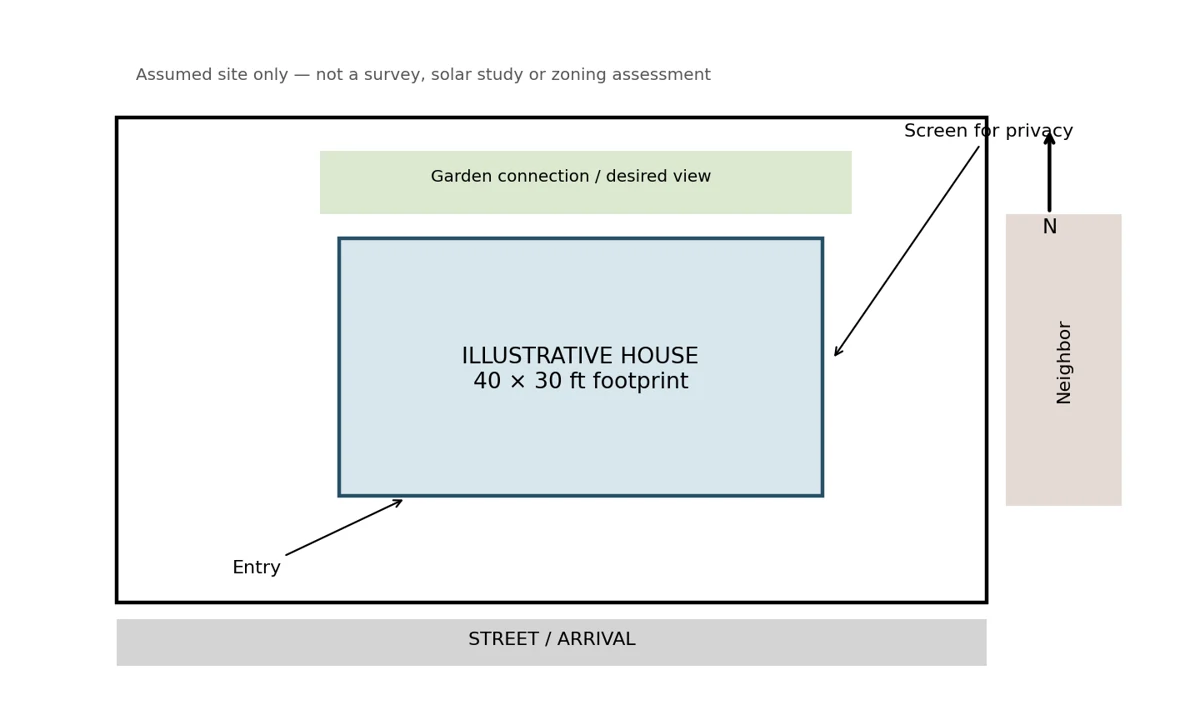
Assume for teaching purposes that the residential lot is approached from the south, the desired garden lies to the north, and a neighboring building is close to the east side. None of these conditions represents a real survey. One possible response is to put entry and service functions toward the street, arrange living spaces to connect with the garden, and investigate screening or controlled openings on the exposed neighboring edge. The same observations might also lead to a courtyard proposal. The next step is to compare these responses, not assume one is correct.
Illustrative site-analysis diagram showing assumed street arrival, orientation, neighboring development and garden connection. Not survey data or Arcadium output.
Architectural Programming, Adjacency and Circulation Before Modeling
Architectural programming translates the client's activities into spaces and relationships. Create a preliminary room schedule that states the purpose of each space, likely occupants, approximate size requirements and important adjacencies. Separate essential rooms from optional spaces and distinguish gross building area from usable room area. Hallways, walls, stairs and service areas consume floor area even when they are not prominent in an initial wish list.
Build an adjacency plan before drawing fixed walls
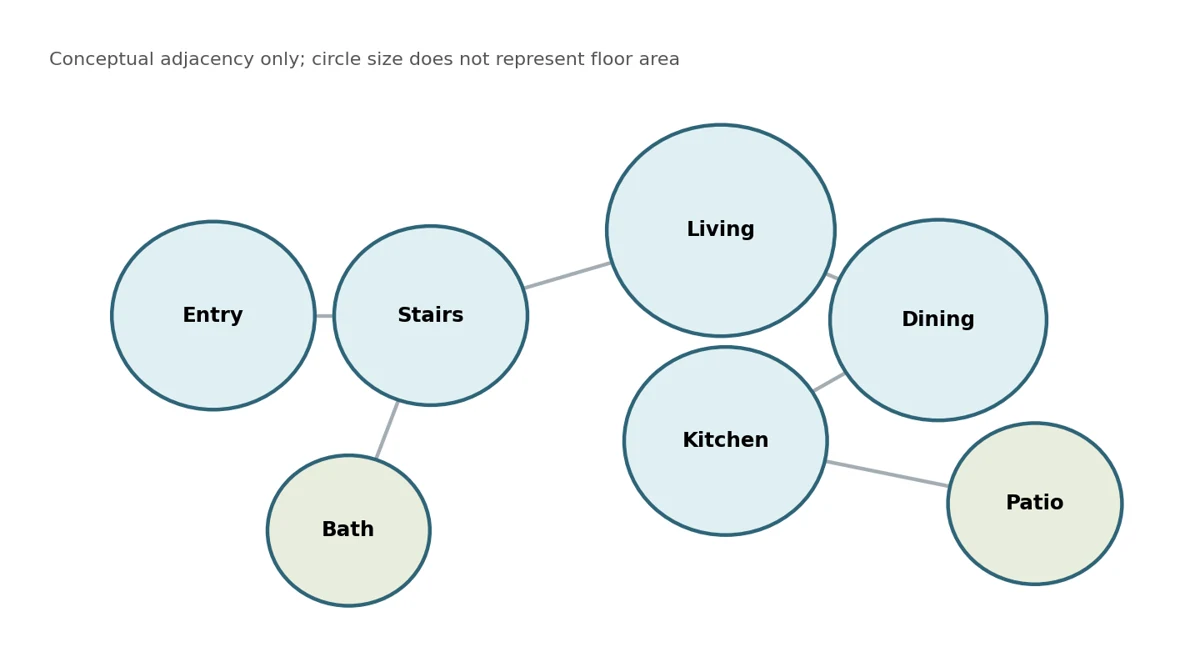
For the sample house, the entry needs a comprehensible relationship with the stair and ground-floor bathroom; the kitchen should connect conveniently to dining and outdoor use; upstairs bedrooms need a more private circulation arrangement. A bubble diagram communicates these requirements without pretending that the arrangement is already dimensionally resolved. Test at least one alternative: shifting the stair can improve a living space but complicate upstairs circulation.
Illustrative bubble diagram of desired ground-floor relationships; the circles show connections, not measured dimensions or a completed Arcadium plan.
Test circulation and usable floor area
Trace the route from entrance to living space, kitchen and stairs; then test routes from furniture to doors. A room can have an adequate nominal area but still be awkward when door swings, storage and movement are considered. Evaluate access for different users and avoid treating common rules of thumb as automatic code approval. In the model, place appropriately scaled objects to identify pinch points, then review the same spaces in plan and walkthrough views.
Turn planning into a design hypothesis
Write down the intended relationship between the ground-floor living area and the garden, then construct a simple preliminary plan that attempts to achieve it. Each important wall should have a reason: defining a private zone, supporting circulation, containing service rooms or maintaining a useful relationship between spaces. Only after these relationships are tested should the layout become more precise in Arcadium.
Step-by-Step Tutorial: Create a Two-Story Architectural Concept in Arcadium 3D
For the walkthrough, imagine a new two-story home with a preliminary 40 × 30-foot building footprint. The client wants an open ground-floor living and dining area, kitchen, bathroom, patio access and upstairs bedrooms. These dimensions are a teaching example—not an assessed site or a finished architectural proposal. Adapt the workflow to your own surveyed measurements and program.
Step 1: Create a project and set your units
Open arcadium3d.com and start a project in the browser. Follow the current sign-in or project-creation prompts, if presented.
Open the menu in the top-left corner and choose feet and inches. Arcadium also supports inches, millimeters and meters, and the displayed measurements change with the selected unit.
Take a moment to locate the wall tools, model library, edit controls, view controls and menu for sharing or exporting. Begin in a top-down view so the initial footprint is easier to understand.
Write down the assumptions behind the project: footprint, proposed number of levels, approximate room program and the source of measurements.
Why this saves effort: Setting units before the first wall is drawn makes numerical editing much easier later. Arcadium runs in a browser without a separate desktop installation, which can also make it convenient for quick concept sessions.
Step 2: Import an existing floor plan or begin from scratch
An architect remodeling an existing building can import a 2D floor-plan sketch as a reference and trace walls over it. Begin with the best available measured survey rather than treating an unscaled image as proof of dimensions. After importing the reference, use a known dimension to establish its intended scale, trace the important perimeter and partition walls, and compare several model dimensions against your survey. Arcadium’s guide documents importing a 2D floor plan and tracing over it; the exact supported file types should be checked in the import dialog when publishing.
For a new design, start with a blank scene. Use a simple rectangle to investigate the illustrative 40 × 30-foot footprint before adding individual spaces. Starting with clear geometry makes it easier to compare alternative arrangements without reconstructing an elaborate model.
Architect’s check: Mark which geometry represents verified existing conditions and which is proposed. Do not let an attractive traced model conceal inaccuracies in the underlying reference.
Architectural practice: importing and checking an existing building
For an addition, start from a measured drawing where possible, identify at least one independently checked dimension and confirm the imported reference is scaled correctly. Trace existing walls separately from the proposed arrangement in the architect's working logic; use grouping and visibility thoughtfully where supported rather than relying on color alone to communicate what is existing. Test several measurements across different directions because one correct reference length cannot detect every source-drawing error. Lock a reference only if the active Arcadium interface confirms the applicable lock workflow; do not suggest an unavailable setting. Differences between as-built conditions and the model should be recorded as assumptions for later site verification.
Step 3: Draw accurate exterior and interior walls
Select the wall tool. Click the first point and then the endpoint to draw a segment; continue clicking to chain segments.
Draw the perimeter first and then create the principal interior divisions. For the illustrative home, reserve a logical route from the entrance to the main living area and stairs.
Use snapping to meet other wall points and create right-angle relationships. Hold Shift when a deliberately non-snapped placement is needed.
Select a wall to refine its length, height or thickness using the available editing controls and numeric values. Check the effect on the usable dimensions inside the rooms.
For curved elements, select an existing wall line and use Arc or Bézier, then move its handle to establish the required curve. Avoid adding curves unless they serve a convincing design purpose.
Walls are not simply lines on a plan. Thickness affects net interior space, and the layout should provide usable connections between rooms. Inspect corridors, entries and furniture zones before moving on. Where an interior partition shifts, review both rooms rather than considering only the one being enlarged.
Practical efficiency tip: Let wall snapping establish a consistent initial plan, then use exact values to refine dimensions. This is usually more dependable than trying to place every point by eye.
Architectural practice: translate room relationships into wall placement
The wall positions should follow an adjacency and circulation strategy, not just create visually balanced rectangles. Recheck usable dimensions after applying wall thickness, particularly beside the stair and in narrow rooms. A room boundary may shift by only a small amount, yet that can change whether a door opens freely or furniture fits without obstructing the route. Compare the model against the requirements schedule rather than measuring apparent success by how complete the plan looks.
Step 4: Add doors and windows
Open the door or window category in the object library and choose an appropriate component.
Drag the component onto the wall; Arcadium’s supported wall objects create their opening automatically.
Position it along the wall, then adjust size or location with the object editing controls.
For a door, inspect the opening direction and use rotation or mirroring when needed.
Switch from plan to perspective to see how the openings influence circulation and the exterior composition.
Test the main entry first. Then consider a patio door from the living or dining area and bedroom windows upstairs. Do not treat window placement as decoration alone: opening positions influence privacy, views, facade rhythm, and opportunities for daylight. At concept stage, review visible effects and the relationship between openings; carry out separate analyses when daylight, energy or glazing performance must be demonstrated.
A small exercise: create two different living-room window arrangements. In plan, compare furniture and wall space. In elevation, compare facade balance. In perspective, look at the implied view and sense of enclosure.
Architectural practice: balance daylight, privacy and building appearance
Before fixing an opening, ask what each room needs from it: a view, natural light, ventilation potential or a direct outside connection. Consider the privacy impact on neighboring homes and the composition of the exterior elevation. The model can help compare two window arrangements, but it cannot establish annual daylight levels or compliance with ventilation and energy standards simply by looking convincing. Early environmental choices should also account for climate-specific solar gains, shading and glare.
Step 5: Model a second story and staircase
Arcadium documents multi-floor workflows, including duplicating an existing level and raising the copy or using level controls. Develop the ground floor before duplicating or introducing an upper level. Edit the second-story partitions for bedrooms, baths and the landing instead of assuming the ground-floor arrangement should be repeated exactly.
Use the documented multi-floor controls or duplicate-and-raise workflow appropriate to the current editor.
Add a staircase from the floors and stairs or stairs category and position it in relation to the entry and landing.
Adjust the available stair dimensions and orientation, then compare the alignment of the opening and upper-floor circulation.
Inspect the stair location in plan, 3D perspective and a cross-section.
Review floor-to-floor relationships, approximate levels and visible headroom before developing the roof form.
A staircase is one of the best reasons to review a concept in three dimensions: what seems compact in plan may create conflicts with an upper-floor landing or adjacent openings. A visual model is not a substitute for checking actual stair rise, run, headroom, guards, handrails, structural support and local code requirements.
Architectural practice: vertical circulation and feasibility
A stair affects two floor plans and the space between them. Review the stair footprint on the lower floor, the landing and arrival position upstairs, and any floor opening or headroom concerns in a section. Recheck how the stair interacts with doors, circulation and the remaining usable space. A concept model can expose a conflict but does not determine code-compliant rise, run, headroom, guardrails or landings. Large clear spans and unusual openings should be identified as structural questions for suitably qualified professionals.
Step 6: Establish the roof and overall building form
Once the two principal levels are readable, add the roof and appropriate structural or generic shapes. Keep the initial massing simple enough to understand what is driving the architecture. Explore how the roof silhouette relates to the main building volume, whether outdoor elements such as a deck or balcony belong to the concept, and where the facade changes in material or depth.
Arcadium’s object categories include structural elements, shapes, floors, stairs and building components. For more custom geometric studies, the guide describes shape cutouts: a shape can subtract from another supported shape through “Make cutout.” That operation is not a general guarantee that every imported object or library asset can be cut. For a complex concept, confirm the behavior on the actual object before depending on it.
Architect’s check: A visually convincing roof does not establish roof drainage, structural member sizes, weatherproofing details or a compliant envelope. Those belong to later technical coordination.
Architectural massing: choosing the building volume before the details
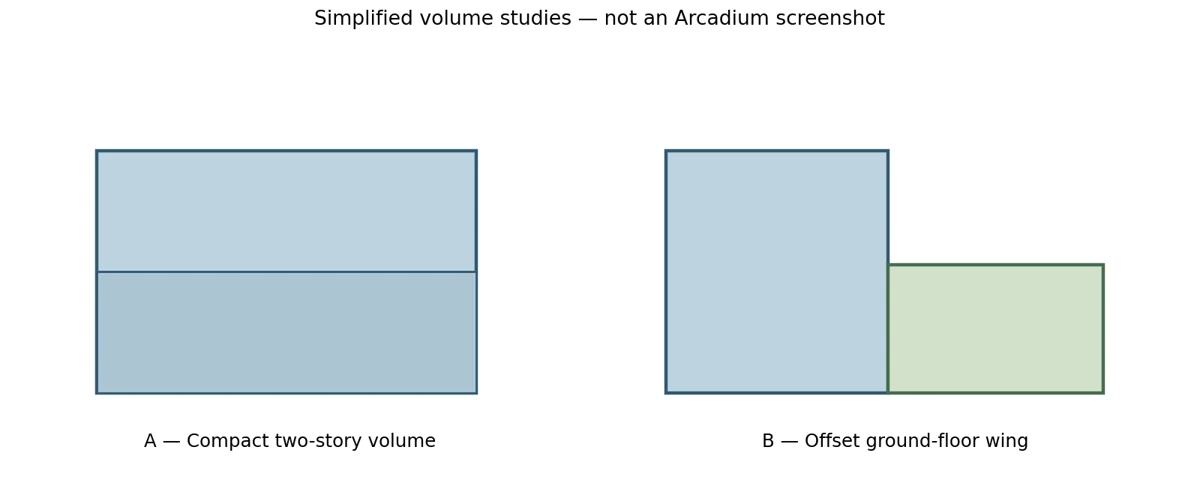
Massing is a study of the building's overall volume, footprint, height and relationship with the site. A compact two-story volume can simplify the external envelope and leave more continuous outdoor area, but may concentrate circulation or create deeper spaces. An offset wing might make a sheltered garden edge or distinguish public and private spaces, but may increase envelope complexity and complicate roof junctions. Neither is inherently better; the site, client brief, practical construction considerations and budget determine the trade-offs.
Conceptual massing comparison for the hypothetical residence. These are editorial diagrams, not model screenshots or tested construction options.
Questions to ask when reviewing massing in Arcadium
Does the building form make the required rooms workable? Where are the entry, outdoor access and private spaces? How does the form change the building's relationship to neighboring structures, light and views? Are there awkward junctions between upper and lower floor geometry? Would a simpler arrangement satisfy the same requirements? Keep early forms sufficiently simple that these questions remain visible; facade details can come afterward.
Step 7: Add objects to test whether the layout functions
An empty architectural plan often makes rooms appear more generous than they are. Open Arcadium’s object library and place furniture that approximates the intended real-world uses: a dining table with seating, kitchen cabinets, sofas, beds, desks and bathroom fixtures. The library also includes lighting, structural and outdoor elements.
Choose an object category and insert a representative item into the scene.
Use the object’s movement, rotation and resizing controls to place it realistically. Numeric input is preferable where a critical clearance or furniture dimension is known.
Duplicate repeating elements where useful, such as similar chairs or furnishings.
Select several objects with Shift-click; group related items with Ctrl/⌘ + G so they move together.
Use the alignment and distribution controls to arrange repeated items consistently. Hide objects temporarily with V when they obstruct the view; lock established objects to protect them during subsequent editing.
Now walk the circulation route mentally and in first person: Can someone move from the entry to the living area without passing through an awkward furniture zone? Can a dining chair pull back without blocking patio access? Does furniture placement expose an undersized bedroom? A preliminary model can reveal these issues, but measured clearance and accessibility requirements must still be verified separately.
Advanced option: When a specific piece is missing from the library, Arcadium documents importing an external 3D model and AI furniture generation from reference photos. These can help present a distinctive concept, but are rarely essential to judging the main architectural layout.
Architectural practice: verify space usability with representative objects
Use realistic object sizes for beds, tables and kitchen counters where supported, and make the model show door swing and the route around furniture. Try a different orientation before enlarging a room: sometimes the architectural problem is an unhelpful opening location rather than insufficient square footage. Where a corridor narrows near the stair, inspect the obstruction from a human-height viewpoint. Treat object-library dimensions as prompts for checking design clearances rather than verified manufacturer specifications.
Step 8: Apply materials and develop a facade direction
Materials are most useful once the building composition is sufficiently resolved. Press P to open the color picker, select surfaces and apply finishes from the documented material categories. Arcadium provides controls for colors and textures, including scaling, rotation, saturation, contrast and brightness. The eyedropper helps match an existing color in the scene.
For the example home, compare a light masonry facade against timber cladding accents with a dark window-frame color. Keep the main architectural geometry unchanged between versions so the client can focus on the actual finish decision. On the interior, use restrained finishes to distinguish the floor, cabinetry and primary wall surfaces.
Concept-stage finishes communicate character and intent, not a verified material specification. Fire performance, durability, detailing, life-cycle requirements and availability must be checked in subsequent design work.
Architectural practice: material expression without premature specification
Materials can reinforce the architectural idea, for example by distinguishing an existing masonry volume from a new lighter addition. Compare appearances with similar camera viewpoints so the client is evaluating the finish rather than being distracted by different compositions. Note that a brick texture does not establish the wall assembly, embodied carbon, weatherproofing or fire rating. Material selection for actual construction will need specifications and separate professional assessment.
Step 9: Add the outdoor context and site relationships
Show the building as part of a place. Insert relevant landscape elements—paths, plants, trees, terrace or deck objects—and position the entry route and patio relationship. Use ground surfaces and simple site context to explain how the building meets outdoor space. Arcadium also describes landscaping, terrain and gradient capabilities on its current website; for graded sites, verify the exact implementation and use proper site data rather than interpreting a visual slope as engineering information.
Compare the model from the driveway or front approach, the backyard and a view from inside the living space. Consider what the building overlooks and which areas need privacy. Landscaping can improve client understanding of scale, but do not imply that the tool automatically checks drainage, survey boundaries or planting feasibility.
Architectural practice: environmental and site relationships
Review garden access, neighboring views and arrival sequences with the outdoor context shown. For ventilation, consider whether the proposed openings offer plausible routes for air movement, including cross-ventilation where site and room arrangement allow; actual airflow depends on weather, opening operation and detailed design. Operational energy can be influenced early by envelope geometry, glazing and shading, but it requires a more specialized assessment to quantify performance. Embodied-carbon considerations may also influence structural and material approaches long before final specifications are chosen.
Step 10: Review the same concept in plan, elevation, section and walkthrough
Changing the camera does not change the model itself. Arcadium provides several quick viewing modes that are especially useful during architectural review. Use the supplied “Learn Arcadium 3D’s view controls to build 3D houses” demonstration alongside the written steps.
Action
Control
Why an architect would use it
Orbit
Right-mouse drag
Evaluate the whole building form
Pan
Left-mouse drag
Move around the current view
Zoom
Mouse wheel
Inspect a detail or the overall building
Plan / elevations
1
Review room arrangements and external composition
Orthographic
2
Compare geometry without perspective convergence
Perspective
3
Show how a person would perceive the space
Cross-section
4
Cut into the model and adjust cut height
Outline view
5
Create a clean line-style view
Reset camera
0
Return to a familiar starting angle
First-person movement
W / A / S / D
Walk through the proposed spaces
Move vertically
E / Q
Change viewpoint height in walkthrough
First examine the floor plan: check the entry sequence, furniture relationships and circulation. Cycle through elevations to review the rhythm of windows and the proportion of the roof. Use cross-section to expose relationships around stairs and upper floors; its adjustable height is a powerful visual inspection control, though it is not the same as a fully detailed, dimensioned building section. Finally, use first-person movement to assess the perceived scale of the principal rooms.
Architectural practice: look for problems each view can reveal
A plan may suggest that a staircase sits conveniently beside the entrance, while a section could reveal a challenging relationship with the upper-floor opening. Elevations show whether window proportions and roof lines produce a coherent composition. Perspective and walkthrough views help identify views blocked by walls and difficult spatial transitions. Use the relevant view to test a specific question, not merely to produce variety for the presentation.
Step 11: Add dimensions, room labels and explanatory notes
A client-facing model becomes more useful when its key information is legible. Arcadium’s annotation tools include dimensions, text, area labels, scale bars, arrows, zones and a compass. Add labels for spaces such as “Living / Dining,” “Kitchen” and “Stair.” Show relevant overall and room dimensions, using a consistent feet-and-inches format for the US example.
Annotate assumptions as well as decisions. If a wall location is preliminary because the survey is incomplete, say so. Keep notes concise, avoid overlapping labels and reserve technical-looking dimensions for values that have actually been checked. In a presentation, a clean annotated plan can often answer questions more quickly than a beautiful rendering alone.
Architectural practice: make conceptual information legible
Label the design assumption as clearly as the actual room. A client should know which dimensions are provisional, where the extent of existing construction remains unverified and which visual choices are alternatives. Use a consistent naming convention for plan views, stages and option labels. A small number of purposeful dimensions generally communicates more clearly than densely annotating every edge at concept stage.
Step 12: Generate AI architectural visuals from the model
An editable building model provides a spatial reference; an AI image explores how that concept could look in a particular visual style. Arcadium documents a workflow that begins from a current model view, a supplied photo or an earlier generated image. You describe desired materials, mood and architectural character, generate images and iterate from a selected result.
Navigate to the camera viewpoint that best communicates the building concept.
Open the AI image-generation functionality and choose the current design view or another supported image input.
Describe the intended architecture rather than only asking for a “beautiful house.” Mention materials, frame color, landscape and lighting.
Generate alternatives, preferably with a clear comparison question in mind.
Compare each image with the original model before using it in a presentation. If the generator has altered an opening or building form, treat that feature as a visualization interpretation, not a confirmed design change.
Example prompt: “Contemporary two-story residence, pale limestone facade with natural oak accents, dark metal-framed windows, simple landscaped entry and soft afternoon lighting. Retain the overall building composition and the locations of major openings visible in the source model.”
The two supplied videos—“Create architecture renders with Arcadium 3D” and “Create full renders from a sketch in minutes”—illustrate this type of visual transformation. They are demonstrations of rendering possibilities, not proof of a complete architectural design, construction accuracy or a universal completion time.
Figure 2. Architectural visualization frame from the supplied Arcadium rendering demonstration. An AI image should be labeled as a visualization, not as a verified technical drawing.
Figure 3. Frame from the supplied sketch-to-render demonstration, useful for illustrating a visual concept workflow.
Accuracy note: AI imagery can introduce details that are not present in the editable geometry. Do not approve a window position, building height, material specification or structural connection solely because an image looks plausible.
Architectural practice: evaluate AI imagery against the actual model
Compare the generated visualization with the original view and list any substantive inconsistencies: the number and placement of windows, roof geometry, material continuity, entrance location or unexpected objects. Treat the result as an atmospheric interpretation even if it looks photorealistic. Where model accuracy is essential to a decision, show the actual geometry alongside the rendered visual rather than allowing the render to become the only record of the proposal.
Step 13: Compare more than one concept
At least one alternative is worth testing before the architect and client settle on a direction. For example, develop an open-plan concept with a centrally located stair and another with more separation between living spaces and the stair farther from the entry. Compare both against the client’s priorities: privacy, circulation, daylight potential, room sizes and connections to outdoor space.
Use Arcadium’s precise editing, duplication, grouping, object hiding and undo/redo tools to make changes deliberately. If presenting two distinct versions, use a verified project-copy or separate-project process rather than assuming an automated version-management feature exists.
Decision
Option A
Option B
Living space
Largely open-plan
Partially separated
Stairs
Near entry
More central
Patio access
From living room
From kitchen/dining area
What to test
Views and social interaction
Privacy and circulation
Do not ask clients merely which version looks more impressive. Ask what works better for daily activities, access and the priorities established in the brief. Record decisions and unresolved questions, then adjust the model accordingly.
Evaluate alternatives against stated priorities
Before choosing an option, construct a simple decision matrix from the brief. For the hypothetical house, evaluate garden connection, efficient ground-floor circulation, upstairs privacy, potential daylight, buildability questions and area implications. Assign priorities first and record evidence or unresolved questions for each option. An option that performs better for privacy may perform worse for openness; the point is to surface a deliberate trade-off, not fabricate a mathematically authoritative winner.
Illustrative assessment: Option A (compact plan) has a potentially simpler envelope and shorter internal routes, but may give the garden-facing rooms fewer layout choices. Option B (offset wing) can create a sheltered outdoor edge, but may increase facade and roof complexity. These are hypotheses to verify, not scored outcomes from a completed test.
Step 14: Share the concept with clients and collaborators
Arcadium documents sharing a project URL that recipients can open in their browser without creating an account. It also documents inviting members to edit the project. Select a clear starting view, copy the share link and send it with a short note explaining what the client should examine. For instance: “Please look at the relationship between the main living space, stair and patio. The roof treatment and upstairs bathroom arrangement are still preliminary.”
An effective concept presentation usually combines an annotated plan, one or two exterior views, relevant interior views and a short explanation of the remaining decisions. A live walkthrough is especially helpful for clients who find conventional drawings difficult to interpret. Give the client context; an interactive link is not a substitute for an architectural explanation.
Arcadium features an attributed architect review emphasizing how quickly it helps communicate three-dimensional ideas to clients. That is a customer’s reported experience, not a controlled measurement of productivity.
Organize a productive concept review with the client
Begin with the problem the project is intended to solve and a concise summary of the site assumptions. Show the parti or adjacency diagram, the preliminary plan, one or two well-chosen sections or elevations, and a small number of 3D views. Explain what changed between options and ask specific questions: Is direct garden access more important than separation from the living room? Is a compact circulation arrangement preferred despite reduced flexibility? Identify items requiring survey, budgeting and technical review so that visual enthusiasm is not mistaken for a final approval.
Step 15: Export the concept for presentations and later work
Arcadium documents 3D exports in GLB, OBJ and STL, as well as printing selected views to PDF. These formats serve different purposes. GLB can carry model color information; OBJ transfers geometry to compatible 3D workflows; STL is principally geometry-focused and commonly used for 3D printing. A PDF can communicate views for review or presentation.
Choose the output based on what the receiving person needs. An interactive shared URL may be best for spatial feedback; an annotated PDF can be easier for a meeting pack; a 3D export may be useful when geometry is needed in another compatible application. Always test geometry, scaling and material transfer in the destination program before relying on a handoff.
Do not assume that these formats provide native Revit projects, DWG drawings, IFC building information or an automatically coordinated BIM model. Later architectural design may require the agreed concept to be developed or reconstructed in specialist systems.
Choose outputs based on their actual purpose
A PDF of labeled views may be appropriate for a client discussion; a GLB or OBJ may be useful for a compatible 3D visualization workflow; an STL may serve a geometry-oriented fabrication exercise. None is automatically a coordinated architectural BIM deliverable. Confirm downstream compatibility before promising interchange with specialist software, and include drawing dates, option identifiers and the current level of verification with shared files.
Step 16: Save, revisit and refine
The value of a digital concept is that decisions can evolve. Arcadium documents autosave and manual save behavior, together with common shortcuts for undo (Ctrl/⌘ + Z), redo (Ctrl/⌘ + Shift + Z), duplicate (Ctrl/⌘ + D), group (Ctrl/⌘ + G) and show/hide controls. Maintain a reliable connection when using the browser-based editor, confirm your work has been saved and preserve presentation versions in a consistent project workflow.
After a client review, revise the specific items agreed—not every decorative element. Recheck the plan, elevations, section view and walkthrough following changes to walls or openings. A change that solves one problem can create another elsewhere.
Maintain a clear revision trail
When a client approves a concept direction, retain a recognizable copy or documented record of that option before further edits. Date key decisions and note what drove the change. After moving a stair, recheck both levels; after changing window positions, review the exterior elevations and furnishing arrangements. This is a review discipline rather than a claim that Arcadium offers automatic architectural change tracking or version comparison.
Where Architectural Concept Design Software Helps Most
New residential architecture
For an early home concept, Arcadium can bring preliminary floor plans and building form into the same editable environment. The architect can explore room adjacencies, stair location, roof expression, facade openings and interior scale, then invite a client to explore a perspective view.
Home additions and renovation concepts
Starting from an existing plan allows preliminary alterations to be compared with the current layout. Clearly distinguish measured existing conditions from proposed walls and openings. One Arcadium customer reports using the software to reproduce an existing property and explore restoration and extensions, later contributing to a planning approval process. The testimonial describes that customer’s experience and should not be interpreted as guaranteed approval or a technical certification of the model.
Office and other commercial space planning
Early commercial concepts can use walls, furnishings, dimensions and walkthroughs to test spatial organization. For offices, compare meeting-room arrangements and shared work zones; for hospitality, inspect how furniture affects movement and usability. Applicable occupancy, egress and accessibility requirements still need project-specific professional review.
Architectural projects with substantial outdoor space
Simple landscape context helps evaluate the relationship between a building and its exterior. A patio, approach path or planted courtyard may change how the architecture is experienced. Arcadium’s separate landscape articles provide further examples, while detailed grading, drainage and site design remain separate technical tasks.
Additional Early-Stage Architectural Applications
Hospitality and guest accommodations
Concept modeling can help establish repeatable guest-room arrangements, entry and bathroom relationships, furniture fit and an understandable guest experience. The design team should also flag circulation, accessibility and life-safety questions for the appropriate project stage. A convincing image of a hotel room is not evidence that its clearances or egress arrangements are compliant.
Small commercial and early feasibility projects
For a showroom or small commercial building, an architect might test functional zones, customer arrival and back-of-house access before investing in detailed documents. Small changes to core location or entrance arrangement may have significant effects on circulation. Use Arcadium's basic geometry, objects and perspective views to make those trade-offs visible while preserving the need for professional occupancy and code analysis.
Outdoor-focused building projects
A building with a courtyard, patio or landscaped approach should be examined as a relationship between indoor uses and external space. Test entrances, sightlines and access routes before creating polished landscape imagery. Existing trees, drainage, slope and boundary conditions should remain provisional until properly verified.
Why 3D Modeling Can Improve the Early Design Conversation
Three-dimensional modeling is valuable because it helps make design choices visible. The architect can examine circulation from a plan, inspect massing from outside and then walk through a key interior space. These views do not replace professional judgment; they help the team discuss the same design with fewer ambiguities.
Arcadium’s adjustable walls, parametric openings, ready-made models and numerical controls can also reduce the amount of repetitive work involved in exploring certain alternatives. For example, moving a window and checking its effect in elevation is more direct than redrawing separate presentation sketches for each option. The benefit depends on the project and the user’s experience, so this guide does not promise fixed time savings.
Because sharing occurs through a browser link, clients can review a three-dimensional concept without learning a complex modeling application. The best result is not merely a faster presentation: it is feedback tied to the actual design decisions that the architect is trying to resolve.
How Fast Can You Develop a Concept in Arcadium?
There is no reliable universal number of minutes for producing a professional architectural concept. A simple room arrangement, a house footprint and a complex multi-story proposal involve very different amounts of work. The short demonstrations supplied for this article show navigation and rendering actions, not a timed end-to-end commission.
A more useful way to evaluate speed is task by task. Wall snapping can accelerate the initial layout; numerical inputs reduce corrective nudging; parametric windows and doors simplify opening changes; preset objects help test rooms without modeling furniture individually; camera shortcuts allow immediate inspection from plan, elevation or perspective; and URL sharing reduces the need to prepare a new file solely for someone to inspect the concept. These are concrete efficiency mechanisms—not independently quantified productivity claims.
Common Architectural Concept Design Mistakes
Starting with the image instead of the requirements
A compelling exterior render may hide weak circulation or a missing functional requirement. Begin with the brief and simple geometry; use realistic materials after the layout is credible.
Trusting an imported plan without checking scale
An image may be distorted, missing dimensions or based on outdated conditions. Check reliable measurements and note where the model is only approximate.
Judging the concept in a single view
A plan may conceal vertical issues; a perspective can disguise tight clearances. Review plan, elevation, section and walkthrough together, especially around the stairs and transitions between spaces.
Adding too much detail too soon
Complex decoration can make rapid comparisons harder. Use representative furnishings to verify function, but keep early alternatives focused on the decisions that matter most.
Confusing AI visualization with the designed building
A generated image may invent facade details, change a window or simplify an awkward junction. Treat visual generation as a communication aid and return to the editable model for dimensional decisions.
Presenting an unverified concept as build-ready
A client may mistake a precise-looking visual model for a permit or construction set. State the level of development, assumptions and further approvals or consultant input needed.
Additional Mistakes That Undermine Architectural Concepts
Drawing individual rooms without planning their relationships
A collection of appropriately sized rooms may still create a weak building if the dining area is far from the kitchen or visitors must pass through a private room to reach shared space. Start with adjacency requirements, trace realistic routes and then adjust walls.
Ignoring daylight, orientation and external privacy
An appealing glazing pattern can create glare, overlooking or awkward room use. Review orientations and neighboring conditions at concept stage, then leave detailed performance to appropriate studies.
Forgetting the second floor while optimizing the first
Moving an attractive ground-floor stair or removing an apparent obstruction can cause an upper-floor landing conflict. Inspect corresponding plans and sections after major changes and identify code checks still needed.
Committing to highly detailed finishes before establishing feasibility
Detailed facade textures can create attachment to a design before its footprint, internal relationships and structural implications have been assessed. Keep early massing studies deliberately simple and progress finishes once core decisions are defensible.
Neglecting a preliminary feasibility conversation
Open-plan spans, unusual cantilevers, extensive glazing or complicated roof junctions may be visually straightforward to model but could affect structure, envelope detailing, budget and approvals. Record these implications and involve appropriate specialists early enough to inform the concept.
How Arcadium Fits Alongside Professional Architectural Software
Arcadium’s strongest role in this workflow is early design exploration, model-based presentation and client communication. It is suitable for testing spatial arrangements, preparing basic building concepts, sharing interactive models and creating architectural visualizations. Other professional systems may be needed when the project progresses to detailed BIM coordination, engineering analysis, performance modeling, specialist consultant interfaces and construction documentation.
A practical workflow may begin with site and brief analysis, move into Arcadium for concept exploration, then carry the chosen spatial intent into further architectural design tools. A GLB or OBJ export can support some geometry-transfer workflows, but it should not be described as a native, fully editable Revit or AutoCAD project. Check receiving software and file compatibility before relying on the transfer.
The AIA’s description of schematic design, design development and construction documents reinforces this boundary: study drawings and visual media help communicate a concept; later project stages develop technical and coordinated construction information.
How Architects Combine Different Design Tools
Hand sketches and parti diagrams are useful for rapidly exploring intent without committing to dimensions. 2D CAD can support precise drafting and coordinated information, while conceptual 3D modeling helps designers inspect spatial and volumetric relationships. BIM platforms organize intelligent building information and support more detailed discipline coordination. Visualization tools help communicate appearance; daylight, energy and structural applications answer specialist technical questions. These categories overlap, but they are not interchangeable.
Choose a workflow by the deliverables needed, the level of project complexity, available collaboration methods and what information must transfer to the next stage. Arcadium fits most clearly into early spatial modeling, visual exploration and accessible client communication. For subsequent design development, architects may need separate detailed drawing or BIM work; a geometry export should not be mistaken for the transfer of fully coordinated project information.
Worked Example: From a Brief to a Client-Ready Concept
Returning to the illustrative 40 × 30-foot house, begin with the client priorities and known site assumptions. Draw the footprint in Arcadium, introduce a main circulation spine and divide the ground floor between the social spaces, services and stair. Add doors and windows, then build an upper floor and test bedroom and bathroom arrangements. Use the furniture library to judge whether intended uses fit. Review the result in plan, elevation and cross-section before adjusting roof form, materials and landscape context.
Next, prepare two alternatives that address a genuine choice—for example, a more open ground floor versus greater separation between spaces. Create a few AI visualizations from views of the model, checking every image against the intended geometry. Finally, label key rooms and dimensions, share the project URL and explain which decisions the client should make. This sequence is a reproducible learning exercise, not a claim of a verified real-world project or a fixed design duration.
Expanded Residential Example: Decisions Behind the 40 × 30-Foot Concept
A more complete hypothetical client brief
Assume the household needs three bedrooms, a small flexible work area, a bathroom on the ground floor, a combined kitchen and dining zone and straightforward access to a garden patio. The priority is to make shared living spaces welcoming while keeping bedrooms private. These are newly introduced teaching assumptions, not information from an actual commission. The 40 × 30-foot dimension describes an illustrative building footprint; the eventual usable area must account for wall thickness, circulation and any design changes.
Establish the site hypothesis
For the purposes of comparison, assume south-side street arrival, a garden to the north and a neighboring house close to the east boundary. Record setbacks, levels, relevant site surveys, planning constraints and tree conditions as unverified. This affects how confident the team can be in early window locations and total available building area. The initial idea is to connect the primary shared rooms to the garden while providing a legible entry route and protecting private spaces.
Develop the program and first adjacency diagram
On the ground floor, place entry, a small bathroom and stair within a sensible arrival sequence. Give kitchen and dining a direct relationship; place living space toward the garden and consider a patio connection. Put the three bedrooms upstairs around a clear circulation route, allowing suitable space for bathrooms and the work area according to the remaining floor area. Check gross and usable areas before claiming the proposed program fits.
Form two alternatives before choosing one
Option A retains a compact two-story rectangle and organizes the stair centrally. This may reduce circulation distance and simplify the building envelope, but might constrain the shape of an open shared area. Option B shifts the stair nearer the entry and creates a slightly offset garden-facing volume. This could improve the connection to outdoor space, but requires more careful assessment of the roof geometry, construction complexity and usable floor area. Neither option is selected on aesthetic preference alone.
Model and review the options
In Arcadium, use the original tutorial to establish units, draw a measured outline, divide internal spaces and insert door and window openings. Review door swings and representative furniture before adding the second story. Add the stair, inspect its upper-floor arrival and test whether bedrooms can be arranged without impractical corridors. Switch between plan and section views, then compare exterior massing and garden access. Record any issue that the model cannot resolve, especially structure, code and actual site conditions.
Find a specific layout conflict and test a response
Imagine the initial stair placement creates a tight transition between the entry and dining zone. First, inspect the plan with representative furniture and door swings; then use a walkthrough and cross-section to understand the stair volume. In Option B, shift the stair toward the entry and revise adjacent partitions. The change might improve the shared-area route but take space from storage or the upper landing. Recheck both stories rather than treating the first improved view as proof of success.
Compare decisions in a simple matrix
Garden connection — Option A: direct garden-facing living area; Option B: potentially more sheltered patio edge. Circulation — Option A: central and compact; Option B: entry-oriented stair but a possible longer upper route. Privacy — compare actual room and window relationships in each option. Buildability — Option A may have fewer external junctions; Option B requires more detailed review. Cost — no numerical conclusion can be made without quantities, scope and specialist input. Client preference — ask which trade-off is more important rather than silently assigning a winner.
Assemble the concept presentation
A useful presentation sequence is: project goals and site assumptions; organizing diagram; labeled ground- and upper-floor plans; a relevant section and key elevations; comparable 3D views of Options A and B; a clearly identified AI visualization if one is used; and an explicit list of unresolved questions. Use Arcadium's share link to enable client exploration, but direct feedback toward the actual decisions: circulation, garden relationship, stair position and privacy.
What must be checked next
Before further professional development, verify the site survey and existing conditions, allowable footprint and height, code and accessibility requirements where applicable, structural implications, stair geometry, building performance and budget. The concept illustrates a design reasoning process; it does not represent completed professional design validation or a permitted building.
Frequently Asked Questions
What is the first step in architectural concept design?
Understand the client’s goals and establish the available site or existing-building information. A concept should respond to a real brief rather than starting with arbitrary shapes.
How do architects turn a sketch into a 3D model?
They establish the sketch’s scale against reliable dimensions, model or trace major walls, define openings and levels, and then refine the building in three dimensions. Arcadium supports importing a 2D reference plan for tracing.
Can Arcadium model a multi-story building?
Yes. Its documentation describes multiple-floor workflows and stair components. More complex technical design requirements should be checked independently.
Can Arcadium show elevations and sections?
Yes. Arcadium documents principal elevation views and an adjustable cross-section viewing mode. These are concept-model viewing features, not automatically a complete set of coordinated construction details.
Can Arcadium be used for an addition to an existing home?
Yes, for concept-stage layout modeling and visualization. Start with accurate existing-condition information, keep existing and proposed work clearly distinguished and obtain appropriate professional checks before construction.
Does Arcadium replace Revit or AutoCAD?
Not for every architectural task. Arcadium is particularly useful for modeling and explaining early ideas, while detailed BIM, technical coordination and construction documentation can require other specialist tools.
Can clients view a concept without installing software?
Arcadium documents project links that recipients can open in a browser without an account. Editing collaboration uses a separate invitation workflow.
Is Arcadium free to use?
Arcadium offers a free starting option. The current pricing page should be consulted for limits and plan-specific features: https://arcadium3d.com/pricing.
Can AI generate a concept directly from a brief?
Arcadium also advertises an AI-to-3D workflow connected to supported AI chat experiences. Any resulting editable model should still be checked for geometry, dimensions, site fit and professional requirements; an AI output is a starting point, not an approved design.
More Questions About Architectural Concept Development
How do you develop a strong architectural concept?
Begin by identifying the most important design problem, then test an organizing idea against the brief and site. A strong concept produces defensible decisions about rooms, form, movement and relationships rather than serving only as a stylistic label.
What is the difference between a parti diagram and a concept sketch?
A parti diagram abstracts the central organizing principle, often using a few lines or blocks. A concept sketch explores the potential physical arrangement or character of the proposal. A bubble diagram tests adjacency; a massing study explores three-dimensional volume. All can inform one concept.
How do architects analyze a site before designing?
They establish reliable information about boundaries, levels, access, orientation, neighboring development, landscape and applicable development controls. The value comes from translating those observations into alternative building placements and layouts, not merely collecting them.
How do architects decide where rooms belong?
Architects translate a client's activities into a room schedule and adjacency relationships, then evaluate access, privacy, circulation, orientation and practical furniture use. Preliminary plans are tested and adjusted rather than fixed immediately.
Why does architectural massing matter?
Massing determines the overall relationship between building volume, site, neighboring development and outdoor space. It influences the internal layout and can affect facade complexity, light opportunities and preliminary feasibility.
What comes after an architectural concept is approved?
The team usually develops the agreed direction through more detailed drawings, coordination, analysis, consultant input and required reviews. The actual stages and deliverables depend on the project agreement and jurisdiction. A concept approval does not mean construction documentation or regulatory approval is complete.
Turning an Idea Into an Architectural Concept You Can Review
A useful architectural concept is one that makes the design choices clearer. The initial plan should describe how the building works, the 3D model should make its spatial relationships understandable and the presentation should help the client respond to specific decisions. Arcadium brings those early modeling and visualization activities into an accessible browser-based workflow. Start with a measured footprint or a reference plan, develop the building one decision at a time, and use the available views to examine the result before sharing it.


 Color palette generator
 3D design from AI chat
 Floor plan creator
 Kitchen design tool
 House design software
 Landscape design software
 Bedroom design
 Office floor plan creator
 Trade show booth design
 How to use Arcadium — full guide
 Community Showcase
 3D object library - free
 Articles and blog

.png)