A kitchen can look beautiful on a mood board and still be frustrating to use. Maybe the island you love would leave barely enough room for the dishwasher to open. Or perhaps the cabinets fit perfectly on paper, but there’s nowhere to put groceries while you unpack them. These are the kinds of problems worth finding before you spend money on a remodel. So, how do you design a kitchen that works as well as it looks? Start with the way you'll use the room, then test your ideas in a measured 3D model.
With Arcadium 3D, you can draw the space you actually have, build cabinet runs from adjustable models, try different countertop shapes, and walk around the result in your browser. The process below follows a kitchen built in a video from Arcadium's official account. We'll cover the decisions that matter as well as the buttons to use, so you can design your own kitchen rather than simply copy the example.
This guide goes further than the software controls. We'll look at the measurements that prevent expensive surprises, how to choose between common layouts, where cabinets and appliances belong, and how materials, lighting, comfort, and budget affect the result. You'll also learn how to bring an existing 2D drawing into Arcadium and build a 3D model around it. The original seven-step kitchen tutorial remains the practical centerpiece, so you can use the planning advice as you work through a real design.
Before You Open Arcadium: Understand the Room
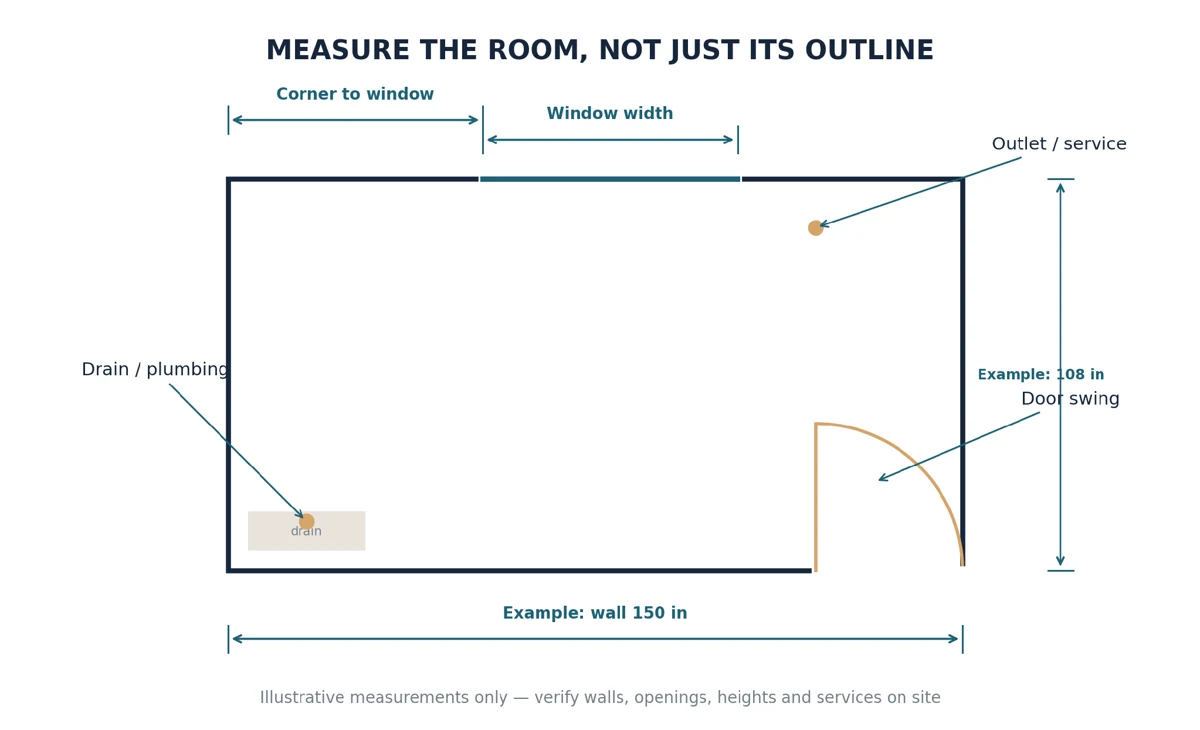
It's tempting to start by dragging an island into an empty 3D scene. But if your walls aren't accurate, even a convincing render could give you the wrong idea about what fits. Measure each wall individually, along with the ceiling height. Note recesses, columns, window heights, door openings, and any walls that aren't square. Photograph the room and record the positions of plumbing, drains, outlets, and ventilation. When you're figuring out how to plan a kitchen layout, these constraints are just as important as the room's overall dimensions.
Next, think about an ordinary day in your kitchen. Where do you put grocery bags? Does one person cook while another washes dishes? Are you short of pantry storage or uninterrupted counter space? Someone who bakes frequently might need a generous preparation area, while a family kitchen may need a dishwasher that can be unloaded without blocking the main route through the room. Asking these questions early is far more useful than choosing finishes first.
Make a rough sketch with dimensions and mark which measurements you've checked on site. This becomes your reference when you create a kitchen layout with measurements in Arcadium. The software lets you enter precise values and work in imperial units, but it can't correct an incorrect measurement. Treat the initial model as something to test and refine, not as a substitute for surveying the room.
What to Measure Before Sketching the Kitchen
Start at one corner and record every wall segment, including the shorter pieces between a doorway and the next corner. In a room that looks rectangular, the back wall and front wall can differ slightly, or one corner may be out of square. A cabinet run designed from the overall room width alone can be too long by the time fillers, end panels, and a refrigerator opening are accounted for. Measure at more than one height where possible, and have a professional verify critical dimensions before any made-to-order purchase.
For each window, note the frame's width and height, the height of the sill above the finished floor, and the distance to the adjacent corners. Record the door opening width, the swing direction, and whether a handle projects into a nearby cabinet. Add soffits, bulkheads, columns, exposed pipes, radiators, uneven recesses, and changes in ceiling height to your notes. Mark existing water supply, drains, outlets, switches, gas connections, and ventilation routes; you may be able to relocate them, but the cost and feasibility should be reviewed before committing to a layout.
Separate measurements into two groups: 'verified on site' and 'assumed or to confirm.' For example, a manufacturer's website might list the overall refrigerator width, but you may not yet know its required side clearance or door opening arc. Keep those assumptions visible in the model so nobody mistakes a plausible-looking arrangement for a finished installation plan.
Illustrative measuring checklist: record individual wall runs, openings, corner offsets, door swings, and service locations. Values are examples, not an actual Arcadium project.
An extra five minutes spent checking a window offset can prevent a tall cabinet from overlapping the opening. See Arcadium's official user guide for entering precise wall and object dimensions; when measuring a complex property, a professional measured survey may be worthwhile.
Find a Layout That Fits the Way You Cook
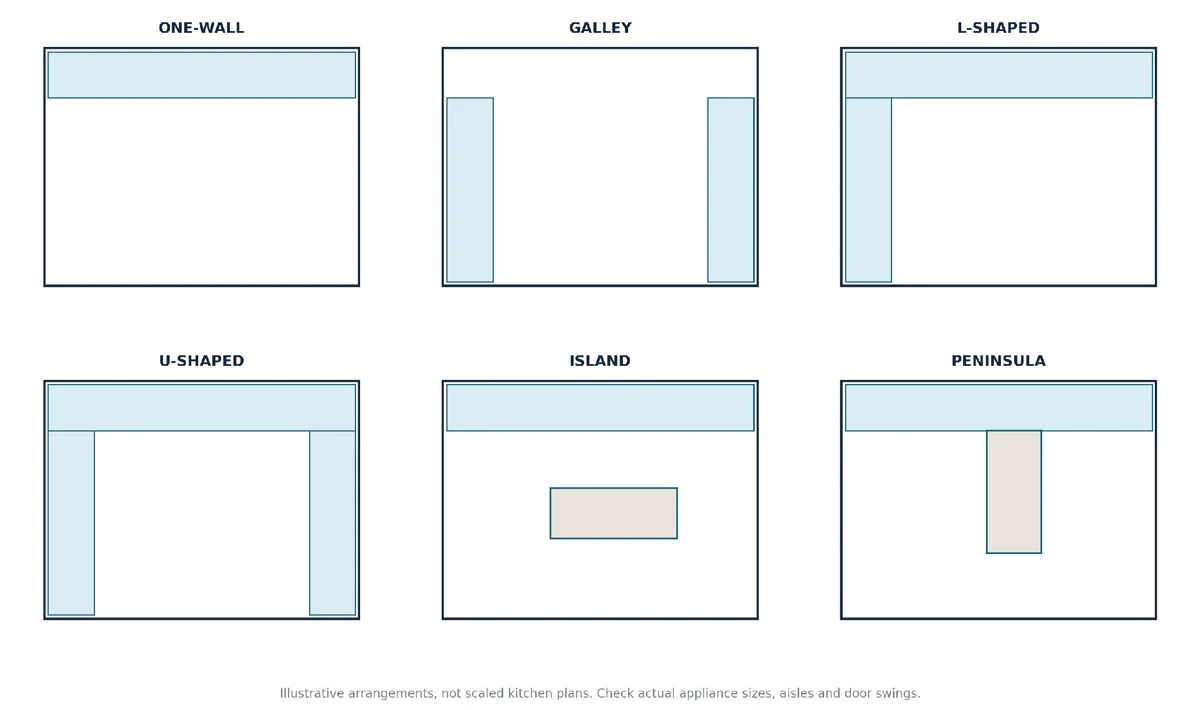
There isn't one perfect arrangement for every kitchen. A one-wall design keeps everything along a single wall, which can suit apartments and open-plan rooms. A galley uses facing runs of cabinets; an L-shaped kitchen keeps the middle more open; and a U-shaped kitchen offers storage on three sides. An island may provide extra preparation space or seating, but a peninsula can be a better choice when the room is narrower. If you're wondering how to design a kitchen layout, compare these arrangements against the same measured room rather than judging them by photos alone.
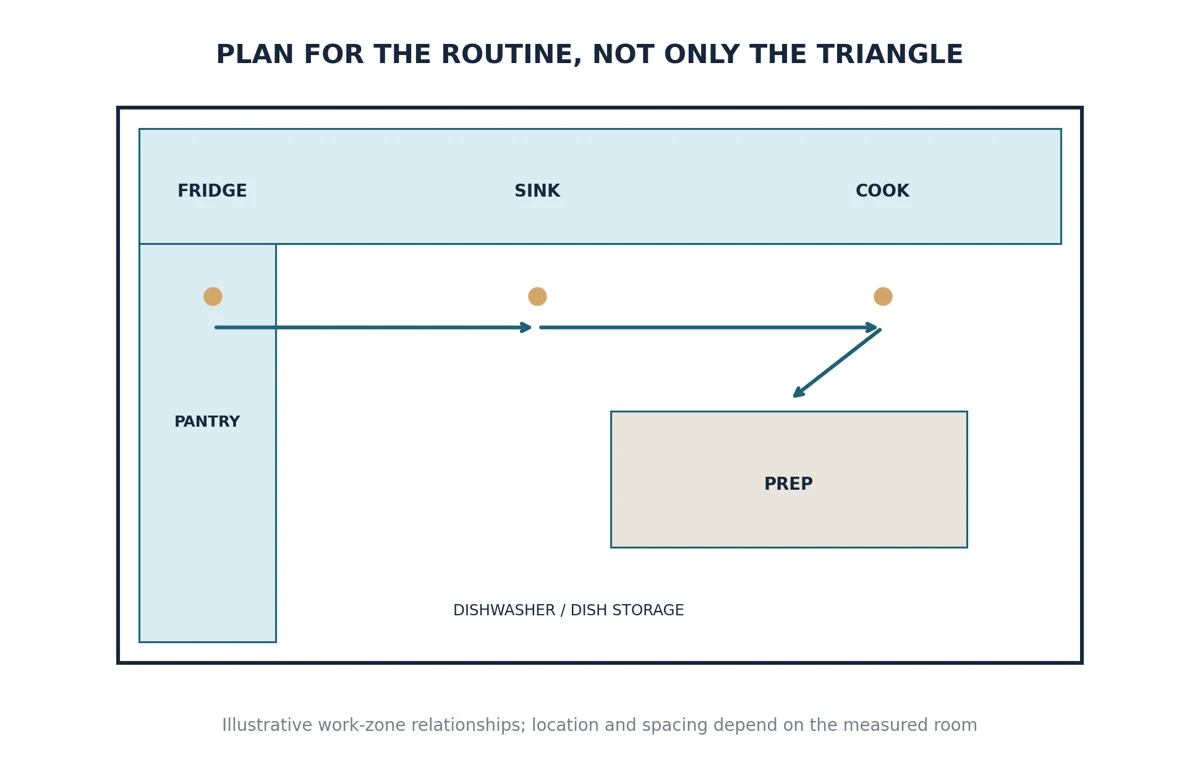
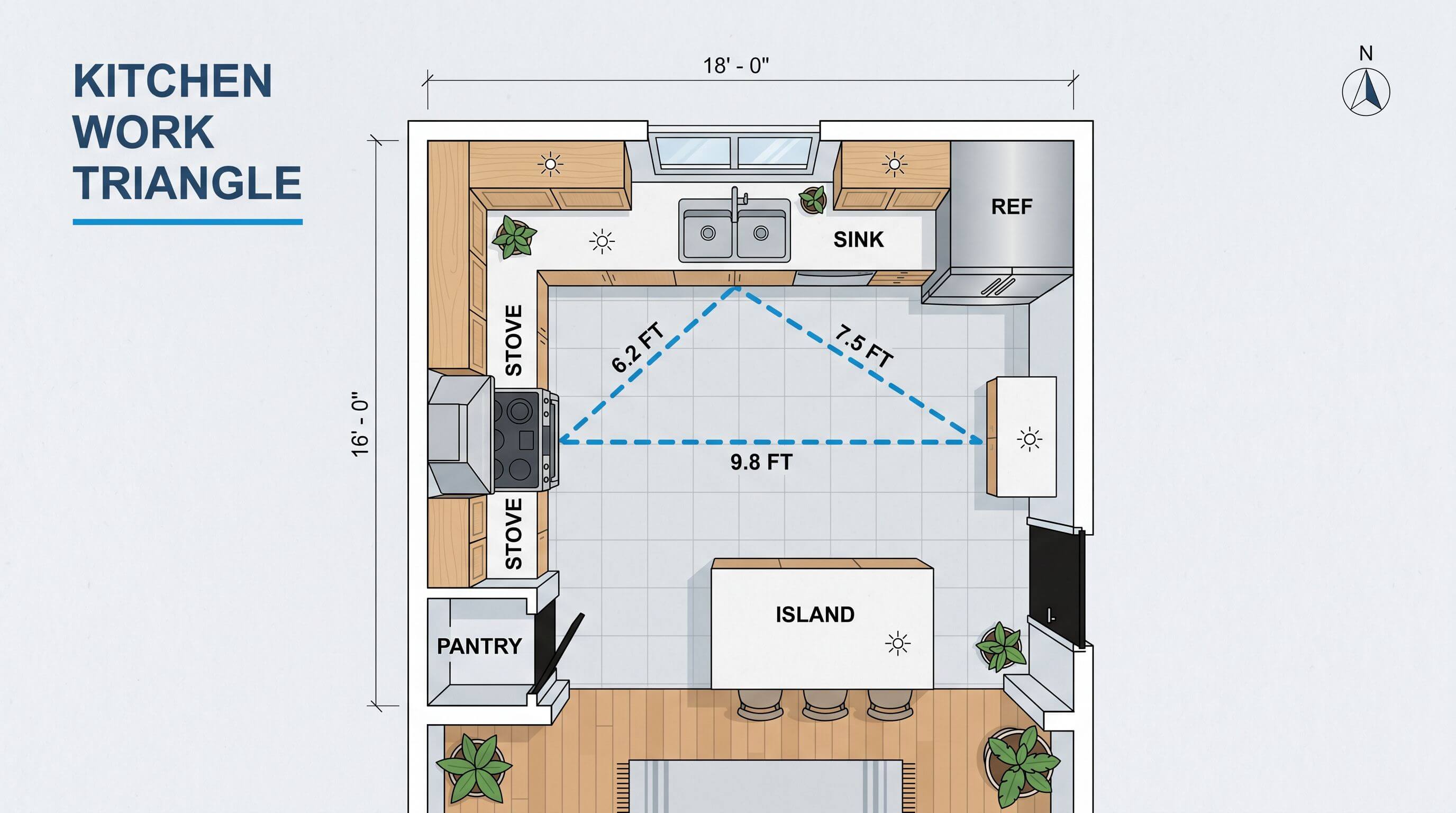
Think beyond where the appliances look balanced. The familiar work triangle—sink, refrigerator, and stove—can be a helpful starting point, but everyday routines often make more sense as zones for storage, washing, preparation, and cooking. Picture taking ingredients from the refrigerator, rinsing vegetables, chopping them, and bringing a hot pan to the counter. A good layout makes that sequence feel natural. That is really what it means to plan a kitchen layout around your household.
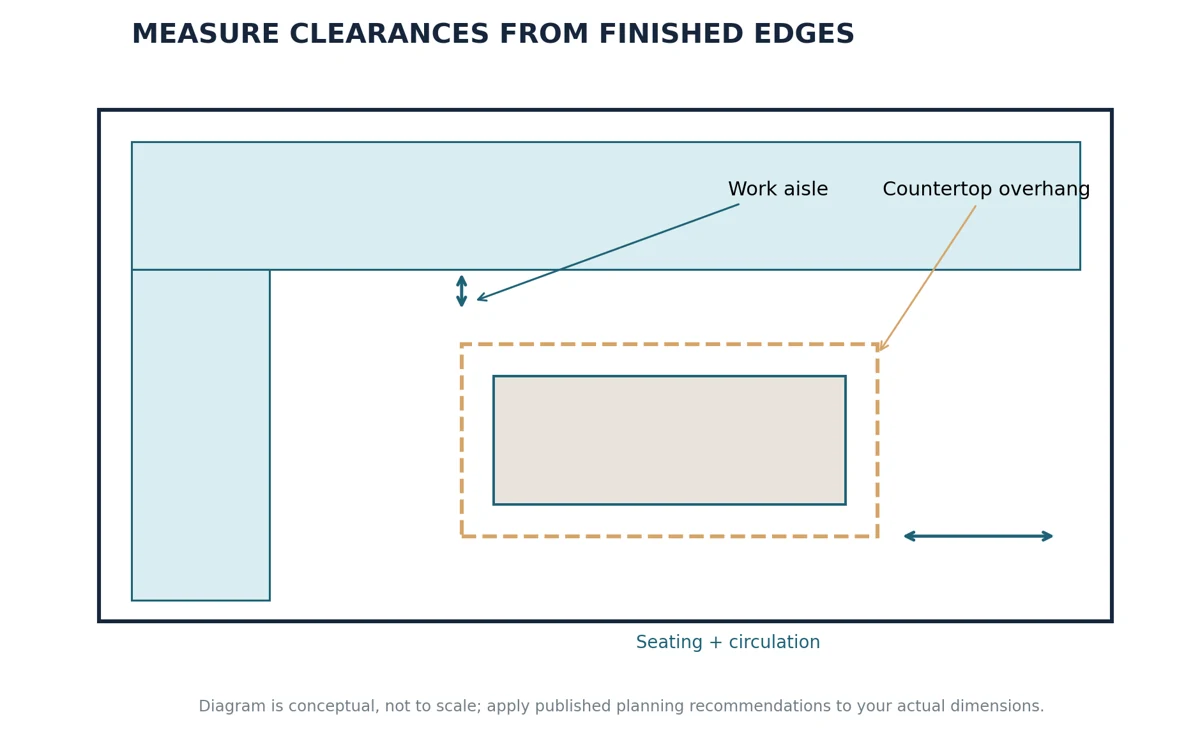
Use an overhead kitchen floor plan layout to check movement and clearance, not just cabinet capacity. The National Kitchen & Bath Association recommends work aisles of at least 42 inches for one cook and 48 inches for several cooks, with general walkways of at least 36 inches. Measure between the edges of finished counters, including island overhangs. These are planning guidelines; local requirements and accessibility needs may call for different arrangements. Arcadium makes it possible to try a smaller island or rearrange a cabinet run before anything is ordered.
Which Kitchen Layout Will Actually Work Here?
A one-wall kitchen puts the sink, cooking zone, refrigerator, and storage along one run. It leaves the rest of an apartment or open-plan room free, but requires discipline: if most of the wall is taken by appliances, preparation space and pantry storage can disappear. A galley kitchen makes good use of long, narrow spaces with cabinets on both sides, although an open dishwasher or two people passing one another can make a tight aisle frustrating. If the galley connects to another room, account for through-traffic rather than planning only for the cook.
An L-shaped layout uses two adjoining walls and often leaves space for a dining area or a compact table. Check the inside corner, where standard doors or drawers can compete for opening space. A U-shaped kitchen offers more countertop and cabinet capacity, but the opposing runs can make a modest room feel enclosed. Island kitchens are most useful when there is room to circulate after countertops, stools, and appliance doors have been included. In smaller rooms, a peninsula attached to one run can offer a similar prep or seating function while keeping the required footprint more manageable.
Layout
Where it often works
What to check first
One-wall
Apartment or open-plan room
Enough uninterrupted prep space and storage
Galley
Long or narrow room
Opposing-run clearance and through-traffic
L-shaped
Two adjacent usable walls
Corner storage and appliance positions
U-shaped
Room with three usable sides
Aisle width and freedom of movement
Island
Room with generous clear floor area
Finished overhangs, work aisles, stools
Peninsula
Room too tight for an island
Entry routes and access around its free end
Illustrative top-down comparison of six common kitchen arrangements, not scaled floor plans or screenshots of Arcadium.
Use the Work Triangle as a Check, Not a Rule
Imagine coming home with groceries, putting cold items in the refrigerator, rinsing vegetables, chopping them, cooking, and finally loading the dishwasher. If the refrigerator is far from the main preparation space, or the dishwasher opens across the route to the sink, your movements will feel awkward even if the traditional sink–stove–refrigerator triangle is compact. Think of storage, washing, preparation, cooking, serving, and cleanup as linked activities. The work triangle is helpful, but a second cook, a second sink, or an open-plan kitchen may call for a different arrangement.
Use the same room dimensions to compare two candidate layouts before you decide. In Arcadium, ask which version leaves more usable countertop near the sink, provides less obstructed circulation, and keeps frequently used items closer to where they are needed. Don't choose a configuration simply because it resembles an inspiration image.
Kitchen Dimensions: Useful US Starting Points
Standard dimensions are useful for early planning, but they aren't a substitute for product specifications. A cabinet manufacturer's catalog may use slightly different door styles, toe kicks, fillers, or hardware allowances. The measurements below are examples from published U.S. cabinetry specifications and NKBA planning materials, not blanket building-code requirements. The NKBA released a fifth edition of its planning guidelines in 2026; because the complete fifth-edition tables require access to the publication, have a kitchen professional check final layouts against the current edition and any applicable local requirements.
Feature or clearance
Common reference (inches)
How to use it
Base cabinet box
34½ high × 24 deep
Check cabinetry and countertop buildup
Typical finished countertop
About 36 high
Adapt height to users and actual materials
Wall cabinet
Often 12 deep; heights vary
Confirm over-counter space and reach
Work aisle, one cook
42 recommended by NKBA
Measure between finished counter edges
Work aisle, several cooks
48 recommended by NKBA
Allow room to work past another person
General walkway
36 recommended by NKBA
Protect circulation routes
Seating at 36-high counter
24 width per diner; 15 knee depth in cited NKBA guidance
Check stools and traffic behind them
J&K Cabinetry's 2026 specification book confirms examples of 34½-inch-high, 24-inch-deep base cabinets and 12-inch-deep wall cabinets. For seating, the previously published NKBA guidance uses 24 inches of space per diner at a 36-inch-high counter and 15 inches of knee depth; check the latest edition for the current recommendation. When planning countertops and appliance openings, model the actual manufacturer's dimensions rather than forcing a catalog product into an assumed 'standard' gap.
Small or Awkward Kitchen? Work With the Constraints
A narrow kitchen often works better without an island. Try a one-wall or galley arrangement first, then see whether a short peninsula still leaves room to move. If a window prevents a wall of upper cabinets, consider concentrating taller storage at the end of the room, away from the natural light. In a room with an angled wall, measure the angle or individual wall lengths instead of pretending the corner is square. Recesses may be helpful for shallow pantry storage, but only if the doors and fittings remain accessible.
When storage is tight, compare deep drawers, better corner access, a taller pantry unit, and wall cabinets sized to suit the ceiling. The objective isn't to cram in the highest possible cabinet count. It's to make everyday essentials easier to reach while leaving a workable preparation surface. Arcadium's adjustable objects let you test whether a narrow base unit or a different refrigerator position solves a conflict before changing the real room.
Make a Budget Plan Before You Fall in Love With a Layout
A new cabinet color and countertop are one kind of remodel; moving a sink, adding an island cooktop, or taking out a wall can be quite another. Compare a 'keep the existing services' layout with a more ambitious alternative. Ask which design would require new plumbing or drainage routes, electrical changes, ventilation, structural work, custom cabinetry, or more complex countertop fabrication. Those items can affect both budget and schedule, so obtain actual quotations rather than relying on generalized online cost figures.
A practical approach is to label your priorities: must-haves, nice-to-haves, and changes that would only happen if the budget allows. Arcadium can help communicate what each option looks like and whether it fits. It cannot estimate the true installed cost or certify that a wall can be removed, so bring contractors and specialists into the decision before ordering materials.
How to Design a Kitchen in Arcadium 3D: A Practical Walkthrough
The official Arcadium kitchen video shows a complete concept taking shape, from bare walls to fitted cabinets, a custom island, lighting, and a walkthrough. Instead of treating the stages as a checklist to rush through, use each one to answer a design question: Does it fit? Can you use it comfortably? And does it look the way you imagined? The on-screen menus may evolve, so check the current editor if a control has moved.
There are two sensible starting points for this tutorial. If you've measured the room yourself, draw the walls directly using those dimensions. If you already have a measured sketch or architectural floor plan, import it as a reference and trace over it. The next part of Step 1 explains that second route in detail; either way, the goal is the same: a properly scaled room before you add kitchen furniture.
Step 1: Build the Room You Actually Have
Begin a project in Arcadium's browser editor. Before adding furniture, open the wall tool in the left-hand menu and trace the perimeter of the room. Click a wall segment to adjust its dimensions, height, or thickness using the available controls. Match the values to your measurements rather than estimating by eye. Once the outline is correct, add the floor so you have a clear surface to work from.
Now place doors and windows where they belong and adjust their size and position. Think about what each opening rules out: a tall pantry cabinet might block a window, while a door that swings inward could clash with an island. For anyone learning how to draw a kitchen design, switching to the top-down view is an easy way to see these conflicts. If you have a source floor plan, Arcadium also supports bringing in a reference, scaling it against a known dimension, and tracing the room where applicable.
Starting with measured walls makes the eventual cabinet arrangement easier to verify.
You now have a reliable starting point for your kitchen floor plan layout. Keep it simple at this stage. Correcting a wall is easy before you've positioned a dozen cabinets; it's much less enjoyable afterward.
How to Turn a 2D Kitchen Floor Plan Into a 3D Design
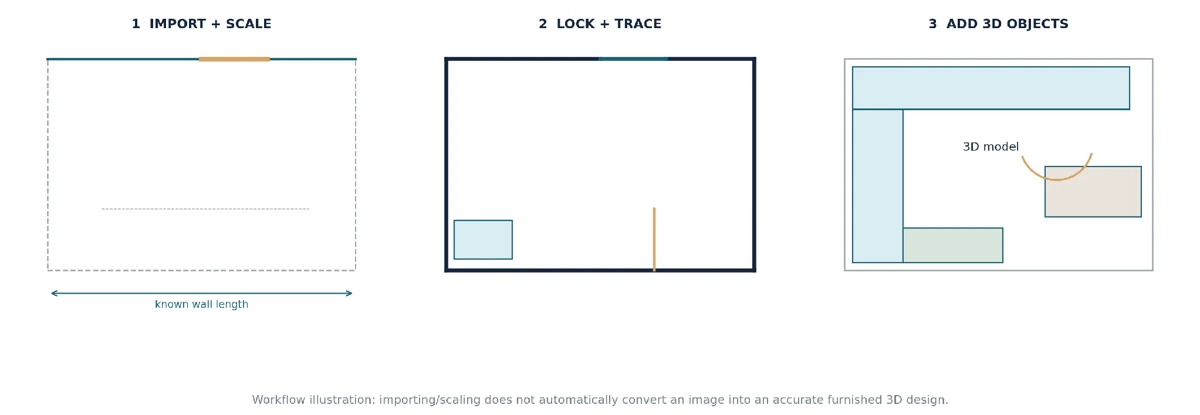
Having an existing 2D kitchen drawing can save a lot of measuring and redrawing time, especially if it was prepared from a reliable survey. But a drawing file or image is only a reference until you've established its scale and recreated the room geometry. Arcadium's documented workflow is to import a floor-plan sketch, set a known length, lock the reference, and trace the walls. That is not the same as a guaranteed automatic conversion of any picture into a finished 3D kitchen.
1. Choose a Measured 2D Reference
Use an existing kitchen floor plan, builder's drawing, architectural plan, or clearly annotated hand sketch. Look for a legible overall footprint plus at least one trustworthy wall or doorway measurement. A photo of a sketch taken at an angle may be distorted, and a marketing floor plan may be expressly 'not to scale'; if dimensions are uncertain, treat it as a guide to layout rather than proof of size.
2. Import the Drawing Into Arcadium
In your Arcadium project, use the Import options to bring in the reference as an image or floor plan, as described in the official user guide. Check that its orientation matches the way you intend to draw the kitchen. You want to see the existing walls and openings clearly enough to follow them; remove irrelevant annotations from your working view only if doing so doesn't obscure important dimensions.
3. Set Its Scale From a Known Measurement
A 2D image may look accurate but still have no reliable real-world scale. Identify a straight wall or doorway on the drawing whose actual length you know, choose that span using Arcadium's documented scaling workflow, and enter the known length. For example, if the measured wall is 150 inches, the reference must be scaled to that length before you trace it. If possible, compare a second independently measured span to catch distortion or a mistake in the source drawing.
4. Lock the Reference Before Tracing
Once the reference is aligned and scaled, lock the imported plan. This stops you accidentally nudging it while you select walls or drag objects around the scene. It sounds minor, but tracing over a moving reference can undo the value of carefully setting the scale in the first place.
5. Trace the Walls and Set the Ceiling Height
Open the wall-drawing tools and trace the perimeter of the room over the scaled sketch. Match corners and changes in wall direction; don't automatically square off an angled wall because it is easier to draw. Select each wall to confirm its length, thickness, and height, and enter the actual ceiling height recorded on site. If a soffit or recess changes the usable space, model that obstruction separately so you can see what it prevents you from fitting.
6. Add Openings and Fixed Architectural Details
Place the windows and doors in their recorded locations, then adjust their dimensions and positions. Check the opening height and which direction the door swings. Add fixed columns, bulkheads, radiators, and other features that could affect cabinets or appliance placement. A floor plan might show a window in the right general location, but if the sill is low, it could still prevent a proposed countertop or tall cabinet from working.
7. Build the Kitchen Inside the Traced Room
When the room geometry matches the original plan, add the cabinets, countertops, sinks, and appliances from Arcadium's library. Work with real sizes where they are available, starting with the major appliances and cabinet runs that dictate movement. The detailed cabinet-editing, custom countertop, and island construction methods follow in Steps 2–4 of the original tutorial, so there's no need to learn a separate modeling process for this route.
8. Compare the 2D Plan With the 3D Result
Move between the overhead plan and 3D views. Check that the modeled wall runs agree with the reference, the window and door offsets are correct, and the appliances can be used without blocking key routes. Add dimension lines for the critical aisles and openings; label any sizes still assumed. The model is more valuable if it exposes a mismatch than if it simply looks like the source drawing. Correct those issues before using the design to discuss a renovation.
Workflow schematic: measured 2D reference → scaled, locked, traced room → model with kitchen objects. This is an explanatory illustration, not a screenshot of an unverified Arcadium import session.
The accompanying original Arcadium screenshots show the wall-modeling and finished-kitchen stages of this process. The import/scale/lock instructions above come from Arcadium's official documentation; a fresh screen capture of that exact editor workflow would be a useful addition before website publication, rather than passing off a generic illustration as a product screenshot.
Step 2: Build Cabinet Runs Without Modeling Everything From Scratch
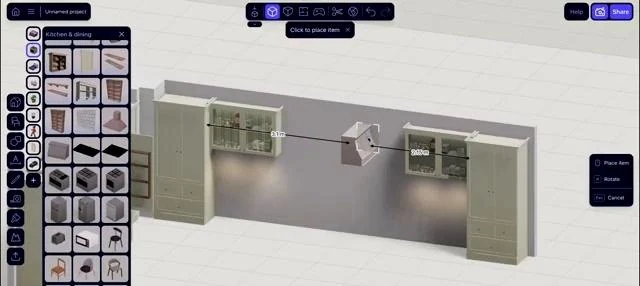
This is where the room begins to look like a kitchen. Open the Kitchen category in Arcadium's object library and browse the available base units, wall cabinets, tall pantry units, corner cabinets, and related fittings. Choose a cabinet close to what you need and place it against the first wall. The models are adjustable, so you don't need to find an object with precisely the right width before you start.
Select the cabinet to reveal its editing handles and dimension controls. Resize it by dragging the blue handles or entering dimensions numerically; use the movement controls to position it, and rotate it when you need to face it in a different direction. Snapping helps adjoining units line up. A useful way to design a kitchen cabinet layout is to get one unit sized and aligned properly before you duplicate anything else. That small amount of care makes the next ten minutes much easier.
With the first unit in place, duplicate it to extend the run instead of adding identical cabinets one by one. Hold Shift to select several objects, then use grouping or alignment controls when you need them to move as a set. In Arcadium's demonstration, the designer also adjusts cabinet depths, heights, and details as the arrangement develops. These controls are particularly helpful when the walls are unusual or a standard unit leaves an awkward gap.
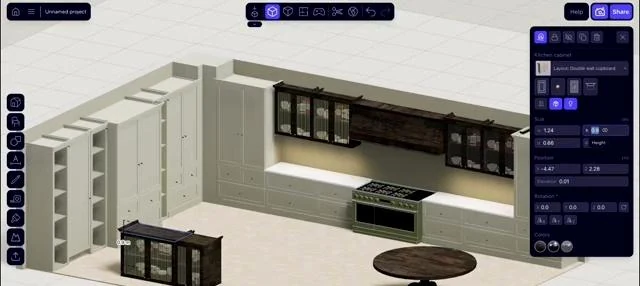
The Kitchen object library provides ready-made cabinets and related components for the design.
A cabinet run takes shape using repeated and adjustable kitchen objects.
Don't forget the less obvious parts of the kitchen. Corner storage, drawer access, integrated appliances, and pantry units can make a big difference to how usable the room feels. When deciding how to design the kitchen cabinets' layout around a corner, look at what happens when the doors actually open, not just whether the objects touch neatly in the model. A tall unit that looks tidy from above might also block daylight or make the entrance feel narrow.
Plan the Storage Before You Fill Every Gap
A row of cabinets can fit perfectly and still be awkward to use. Deep drawers often make pots, pans, and heavy cookware easier to reach than a low cupboard with a shelf at the back. Hinged cupboards remain useful for large items and some under-sink storage, but you should check whether doors clash at adjoining corners. A tall pantry can collect food storage into one place; put it where it won't block an important window, reduce the entry width, or split a useful preparation surface.
Think about where items are used. Everyday dishes and glasses are easier to put away when their cabinets are close to the dishwasher. Cooking utensils, oils, and pans are most helpful near the cooking area, while boards and mixing bowls belong near the main preparation surface. A trash or recycling pullout may work best by the sink or prep area. Cabinet quantity alone isn't a reliable measure of storage quality.
For U.S. cabinetry, a common base cabinet box measures approximately 34½ inches high and 24 inches deep, with a finished counter often around 36 inches high; wall units are frequently around 12 inches deep. Manufacturers vary. When testing cabinets up to the ceiling, also consider access to upper shelves, ceiling irregularities, ventilation, and how the installer will finish the top. Leave room for end panels, filler strips, and appliance housing rather than making every object touch without tolerance.
Arcadium's parametric editing is useful here because you can compare a wide drawer unit against two smaller cupboards, move a tall cabinet to another wall, or change a corner solution without rebuilding the entire design. Still, a resized generic cabinet doesn't confirm a manufacturer can supply that exact configuration; check the cabinet range and hardware before ordering.
Step 3: Position Appliances Around Everyday Tasks
Before adding every last cupboard, work out where the main appliances belong. Bring sink and appliance models into the design from the available library, then adjust the representations to match actual product dimensions. Picture opening the refrigerator while carrying shopping bags, moving dishes from the sink to the dishwasher, and setting a hot pan down near the stove. You'll often spot a problem at this point that wasn't obvious in the first sketch.
Switch back to the kitchen layout with measurements and check the space between appliance fronts, nearby cabinets, and walkways. A dishwasher could fit beside the sink but still open across the only clear route through the room. A stove might have plenty of room in front but too little usable counter beside it. Use the model to question these choices now, then confirm the exact requirements against appliance specifications before installation.
Place Each Appliance for the Way You Use It
The refrigerator should be reachable without walking through the busiest cooking area. Check which side its doors hinge on, whether they can open wide enough for drawers to slide out, and where grocery bags can be set down nearby. A sink and dishwasher are often paired for easy cleanup, but an open dishwasher should not block the only sensible passage. Keep everyday dish storage nearby so unloading doesn't require a trip across the room.
Around the stove or cooktop, plan a practical place for hot pans, ingredients, and the tools you use most often. A useful work surface near the sink makes rinsing and preparing food easier; the older publicly available NKBA guidance recommends a continuous 36-by-24-inch primary preparation area next to a sink. This is planning advice to check against the latest publication, not a universal legal requirement. Refrigerator landing space and the appliance manufacturer's required installation clearances deserve the same attention.
As a realistic example, imagine an L-shaped kitchen where the refrigerator is close to the entrance, the sink sits under a window, the dishwasher is immediately adjacent, and the stove occupies the second run. A person could unload groceries onto a nearby counter, wash ingredients, prepare them between the sink and the stove, cook, and then stack dirty dishes near the dishwasher. Model that route in Arcadium and see whether an island improves it or instead blocks the path. If moving the sink would require major plumbing work, compare the benefits against keeping it where it is.
Illustrative cooking, washing, preparation, and storage zones. Use the arrangement to evaluate everyday movement, not as a fixed kitchen layout template.
Step 4: Give the Island a Shape That Suits the Room
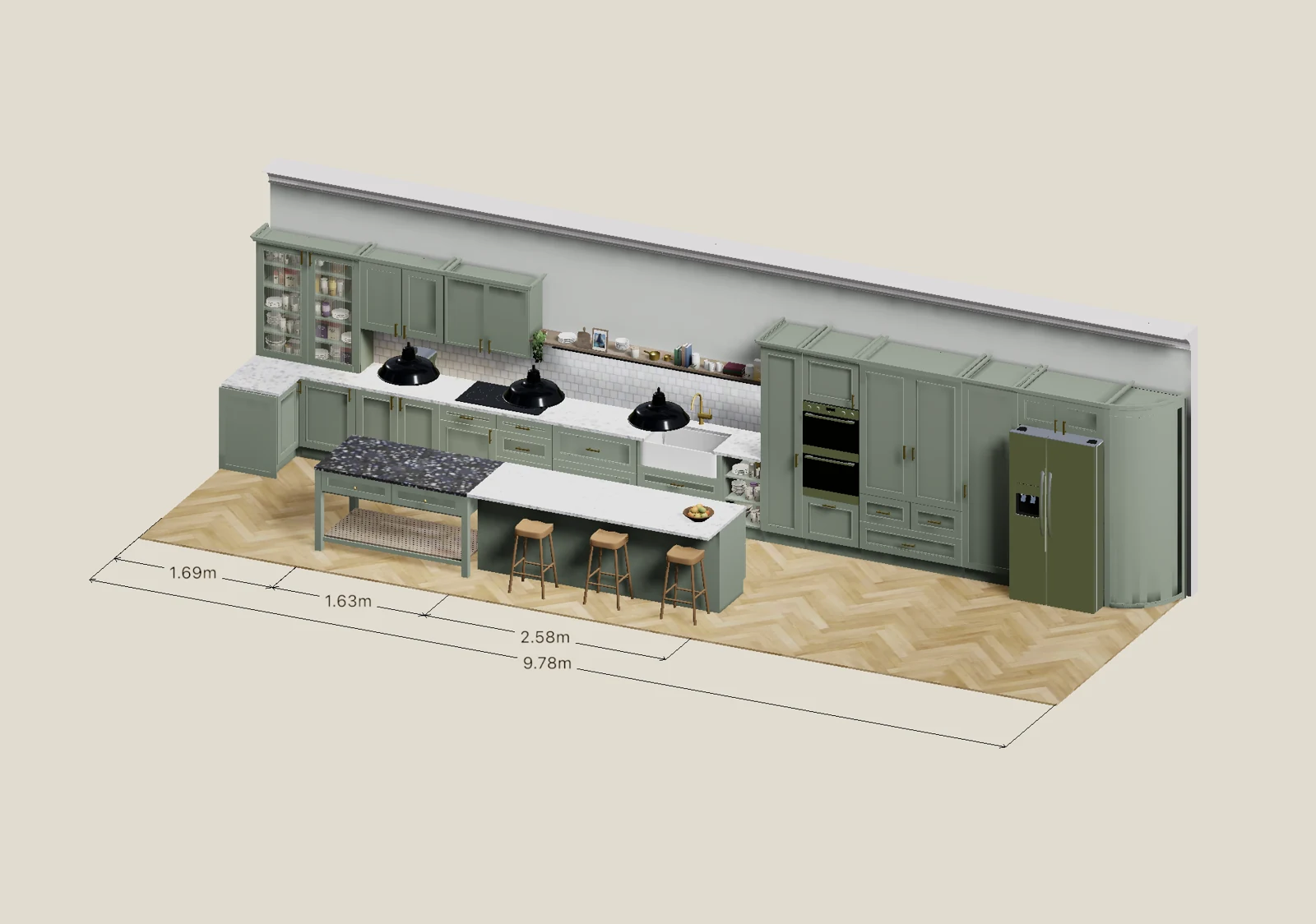
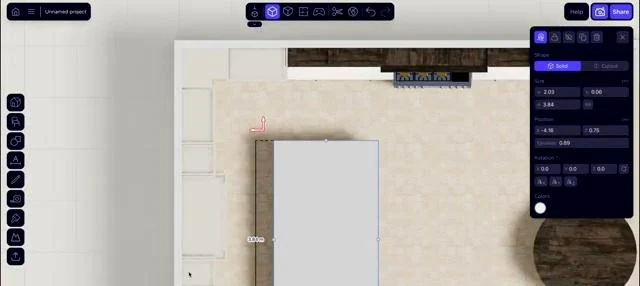
One of the most instructive moments in the official tutorial is the island. Rather than dropping in a single decorative object, the designer assembles it from adjustable cabinets and a separate counter surface. That approach gives you more control over storage, seating, and shape. First, position and align the base units that will support the island. Then open Shapes, add a flat rectangular shape, and resize and raise it until it sits above the cabinets as a countertop. Check the overhang from above as well as in 3D.
An adjustable rectangular shape forms the start of a custom island countertop.
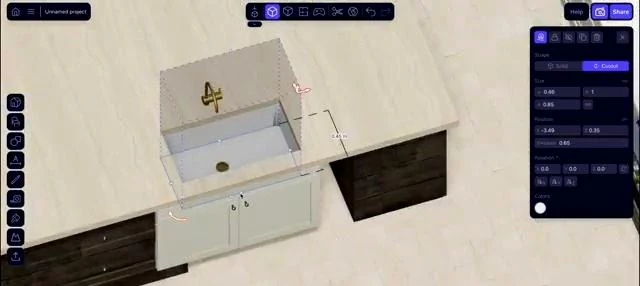
Need an opening for a sink? Add another shape in the intended position and use the cutout function on the counter geometry. The video also shows how a custom shape can form a rounded extension to the island, creating a less rigid seating edge. This is a useful technique for exploring unusual designs without starting a complicated model from nothing. Be careful not to confuse a modeled opening with a fabricator-ready countertop specification.
A cutout shape demonstrates how an opening can be modeled in a countertop.
These custom shapes are particularly useful if you're searching for how to draw a kitchen design that doesn't fit standard modular furniture. Experiment, but keep checking the clearances around stools, appliance doors, and walkways. Final structural support, countertop fabrication, and installation details belong with the relevant professionals.
Is an Island Actually Right for This Room?
The most important island measurement isn't the cabinet's width; it's the finished footprint once the countertop overhang is included. Measure the space between the furthest edges of island countertops, perimeter cabinets, and appliances. As a planning reference, the older publicly available NKBA guidance recommends a 42-inch work aisle for one cook and 48 inches for multiple cooks, while a separate walkway recommendation is 36 inches. These guidelines don't answer every seating or accessibility question, so check the full layout and current standards with a qualified professional.
Seating complicates the calculation. At a typical 36-inch-high counter, previously published NKBA guidance recommends 24 inches of width per diner and 15 inches of knee depth. In addition to knee room, think about how far stools project into the aisle when occupied and whether people need to pass behind them. An island that accommodates three stools on paper may still make the refrigerator or dishwasher difficult to use.
A sink in the island can help the cook face the room, but it also uses up uninterrupted preparation space and may require new plumbing. A cooktop adds ventilation, electrical or gas considerations and needs safe clearances around the hot surface. Sometimes the best decision is to skip the island: a peninsula, narrow movable table, or simply more free floor space may make the kitchen easier to live in. Use Arcadium to compare the options before treating the island as a non-negotiable feature.
Illustrative island clearance check: measure from finished countertop edges, include seating projection, and allow space for open appliances.
Step 5: Try Materials After the Layout Works
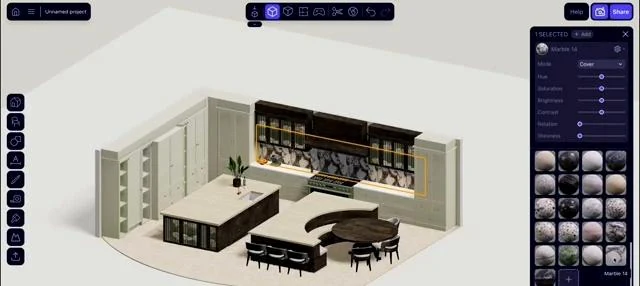
It's much more satisfying to experiment with colors once you know the layout is viable. Select a cabinet—or select several matching cabinets at once—and open the material or color controls. You can try different cabinet fronts, countertops, backsplash treatments, and flooring, then adjust supported texture settings such as scale or brightness. Changing several objects together is especially handy when you want a consistent finish across a whole run.
Material settings help compare kitchen cabinet and surface finishes.
Rather than settling on the first attractive combination, make a few comparisons. What happens if the island is darker than the perimeter cabinets? Do warm wood fronts make the room feel calmer, or do they compete with the floor? This is one of the enjoyable parts of learning how to design your own kitchen: you can explore alternatives before you've bought a single panel. Remember that screens and lighting previews don't replace physical material samples.
Choose Kitchen Materials for Daily Use, Not Just the Preview
A stone-look countertop might be a good visual choice, but the material you eventually specify will determine maintenance, susceptibility to stains, heat tolerance, edge options, and price. Cabinet fronts must tolerate grease, moisture, fingerprints, and frequent cleaning; the finish you love in a render could be harder to maintain in a busy family kitchen. For the backsplash, consider ease of cleaning behind the cooktop as well as color. Flooring should suit spills, foot traffic, cleaning, and the transition into adjoining rooms.
Budget can help narrow the options: standard cabinet sizes and straightforward countertop shapes may be less complicated than a heavily customized installation, but actual costs depend on local quotes and specifications. In Arcadium, compare finishes while holding the floor plan constant, so you can judge the change in appearance without confusing it with a change in layout. Then examine real samples in your own light before selecting products.
Lighting, Ventilation, and Utilities Belong in the Design
Good kitchen lighting has layers. General lighting helps you see and move around the room, while task lighting should make the sink, cutting surface, and cooktop usable without leaving your hands in shadow. Pendant lights over an island can be attractive, but their position and height must suit sightlines and work surfaces. Arcadium's lighting previews help you explore placement and atmosphere; they don't calculate an electrical lighting specification.
The cooktop position also affects ventilation routes, and the sink and major appliances depend on suitable water, waste, and electrical connections. An island cooktop may be harder to vent appropriately than one against a suitable external wall. Check manufacturer installation instructions and use licensed trades where required. Don't wait until the kitchen looks finished in 3D to discover that a design needs unplanned ductwork or significant service changes.
Step 6: Check the Measurements From Above—and the Details From the Side
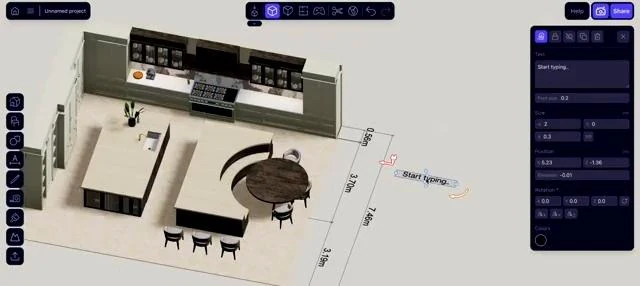
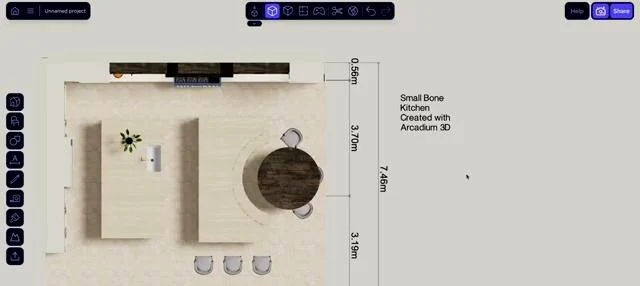
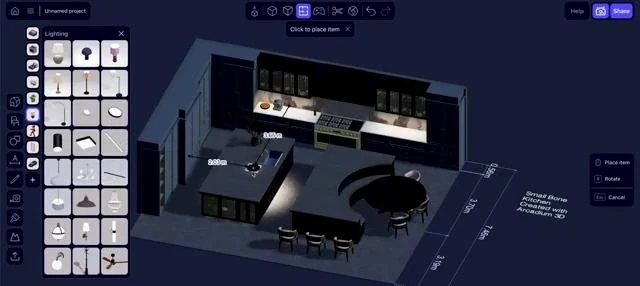
Once the cabinets and appliances are placed, take another look from above. Add labels and dimensions that help you evaluate the design, such as the aisle beside the island, the refrigerator space, and the distance between opposing countertops. If you're creating a kitchen layout with measurements to show a contractor, distinguish measurements taken on site from sizes you've assumed or are still deciding. Outline and elevation views can also help you inspect upper-cabinet alignment and heights without the distraction of surface finishes.
Arcadium’s measuring and annotation tools help communicate the intended layout.
A top-down plan provides a clearer check of circulation and cabinet placement.
Perspective views can make tight corners seem less obvious, which is why the kitchen floor plan layout deserves another careful pass. Could two people work here at once? Can someone walk behind an open dishwasher? Are cabinet handles likely to collide at a corner? The answers matter more than how impressive the rendering looks. Review the NKBA guidance alongside any accessibility requirements relevant to your household.
A Practical Layout Check Before You Approve the Design
Use overhead view and a close-up walkthrough for this final test. Every answer should be based on measured geometry or a specific appliance or cabinet specification, not only what seems comfortable in perspective view.
Check
What you are looking for
Refrigerator
Doors open fully; drawers pull out; nearby landing area
Dishwasher
Open door does not obstruct the main route; dishes stored nearby
Cabinets + drawers
No handle clashes or blocked corner access
Aisles + circulation
Finished edges measured, including island overhangs
Preparation
Usable uninterrupted countertop close to washing/cooking
Island + stools
Seating, knee space, and route behind occupied stools
People + reach
Comfortable access for actual users; turning room if needed
Utilities
Drain, outlets, ventilation and other fixed constraints noted
Dimensions
Verified measurements distinguished from assumptions
Appliances
Real model dimensions and manufacturer clearances checked
The dimensioned view is also the right place to ask another person to challenge the plan. They may notice that an open oven blocks the pantry or that two cooks will repeatedly cross paths. If mobility aids or accessible work surfaces are required, the applicable standard and individual user requirements may justify a different arrangement entirely.
Step 7: See How It Feels, Then Share Your Idea
Now you can bring some life to the model. Try pendant lights over the island, review under-cabinet lighting where relevant, and adjust the scene's environment. Lighting previews are useful for comparing moods and identifying darker areas, though a qualified lighting plan should account for real fixture specifications and task lighting needs.
Lighting and environmental controls give the design a different atmosphere.
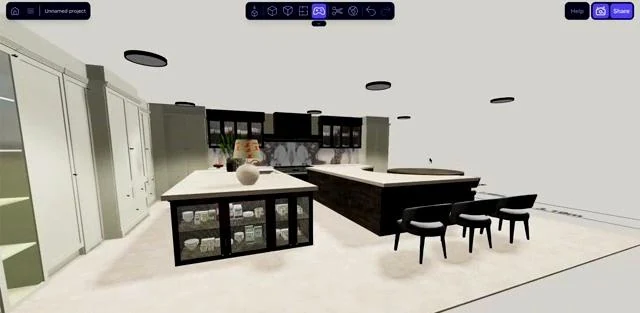
Move around the room rather than judging it from one perfect camera angle. Use overhead and elevation views to inspect the geometry, then try the first-person walkthrough to see the island from the entrance or imagine standing at the sink. Do tall pantry units make the room feel crowded? Is there enough visual space around the seating area? This is where a 3D model starts to feel more useful than a flat sketch.
The completed kitchen can be inspected from an eye-level perspective.
When the arrangement makes sense, use Arcadium's share link so family members, a designer, or a contractor can look at the proposal in their own browser. Printable PDF views and supported 3D exports can help communicate the idea in other settings. Present it as a design concept, though: measurements, service connections, materials, building rules, and installation drawings still need appropriate verification.
Review the Kitchen for Yourself—and for Everyone Who Will Use It
First, walk through the model as if it were an ordinary weekday. Start at the entrance with groceries, stand at the sink, imagine opening the oven, and move toward the trash and dishwasher. Repeat the tour from the perspective of someone else who uses the kitchen: perhaps a child helping with meals, a taller cook who wants an appropriate work surface, or a family member who needs more turning space. Check whether frequently used storage is within comfortable reach.
Second, share the measured proposal as a discussion tool. A family member can react to the seating or sightlines, and a kitchen professional can flag conflicts with appliance specifications or installation requirements. Include important dimensions and labels with the project link or printable view. A clear, accurate concept makes feedback more specific than a single attractive rendering.
What Happens Before a Real Renovation Begins?
Once the layout is chosen, check the actual site dimensions again, including wall squareness and floor or ceiling variations. Confirm the exact appliance models and their installation requirements; obtain cabinet and countertop fabrication drawings; and review plumbing, electricity, ventilation, and any structural changes with the appropriate professionals. Permits and inspections vary by location, so verify local rules rather than assuming a design that looks right on screen is ready for construction.
For accessibility, plan around the person who will actually use the kitchen rather than treating one clearance number as suitable for everyone. The U.S. Access Board's ADA kitchen guidance, where applicable, includes 40-inch clearance for certain pass-through kitchens and 60 inches for certain U-shaped kitchens. These are technical accessibility provisions for covered situations, not automatic requirements for every private home. An accessibility specialist can help assess work-surface height, reach range, turning room, and safe access to appliances.
Why Arcadium Can Make the Process Quicker
The video supplied by Arcadium is titled 'Design a Full Kitchen in 15 Minutes,' and its demonstration footage runs for roughly ten minutes. It shows an experienced user creating a substantial kitchen concept surprisingly quickly. That is good evidence of a fast modeling workflow—not proof that every homeowner can measure, plan, and finalize a renovation in a quarter of an hour.
The speed comes from reusable, adjustable objects. Once a cabinet is sized correctly, you can duplicate it, snap copies into place, select related items, and update their finishes together. Grouping helps you move an island assembly without pulling it apart. Hiding or locking finished objects can make detailed editing less fiddly. Instead of remodeling every item whenever you change your mind, you can revise the layout while keeping much of the work you've already done.
Arcadium also documents AI-assisted visualizations, AI furniture generation, reference images, and custom-model imports on eligible plans. These can help with style exploration or specialized objects, but they're separate from the core measured-model workflow. An AI-styled picture is not proof that its cabinets, aisles, or finishes match the buildable design. Use the model and verified dimensions for those decisions, and check the current pricing page for plan-specific access.
The Kitchen Problems Worth Catching Before Construction
An island is a classic example. It can look like the centerpiece of your dream kitchen right up until you try to open the oven, pull out a stool, and walk around somebody cooking. If you're considering how to design a kitchen layout with an island, test its finished footprint—not only the cabinets beneath it. Sometimes a slightly smaller island or a peninsula makes the entire room work better.
Storage can cause similar surprises. A kitchen might have plenty of cabinet doors but nowhere sensible to keep everyday dishes, pantry items, or the trash bin. Think about what you reach for at each work area, then place storage accordingly. Check blind corners and the space needed to pull out deep drawers. A few minutes moving objects around in Arcadium could help you avoid a much more expensive regret.
Finally, remember the people who will use the room. Planning a kitchen layout for real life means considering reach, mobility, cleaning, ventilation, and how many people might be cooking together. Arcadium is useful for revealing spatial conflicts; it cannot determine compliance with local codes or confirm that electrical, plumbing, and accessibility requirements are satisfied. Get professional advice where the project calls for it.
More Problems Worth Finding Before Cabinets Are Ordered
An oversized island is only one example. Too little uninterrupted counter space can force you to prepare meals on the dining table, while poorly positioned cooking equipment can leave nowhere safe to set hot cookware. Tall cabinets may shut out daylight, and a cupboard that fits against a corner can still have a door that collides with the next unit. Solve these by checking real cabinet and appliance sizes, opening directions, and the sequence of everyday tasks, then testing a different arrangement in Arcadium.
Other mistakes happen because important details were treated as decoration: leaving lighting and ventilation until last, overlooking the route of a drainage pipe, or selecting a finish that won't suit how the room is cleaned and used. A carefully measured model is helpful for spotting spatial conflicts, but it doesn't assess every installation or code issue. Record unresolved questions and take them to the relevant designer, contractor, or installer before committing to purchases.
Can You Start Designing a Kitchen for Free?
Yes. Arcadium's free plan currently includes two projects, access to its furniture models, a maximum of 30 objects per project, and one floor plan generation. If you're exploring how to design a kitchen layout for free, that can be enough to test a simple room, arrange key cabinets, and see whether an island works. Keep in mind that each separate object counts toward the limit, so a highly detailed kitchen may need more capacity.
For a useful free-plan experiment, start with the walls, main appliances, and the cabinet runs that determine circulation. Leave decorative objects and minor details until you're confident the arrangement works. This approach helps you learn how to design a kitchen layout for free without using up the allowance on things that don't affect the crucial decisions.
If you want to develop several variations, add many individual components, or import specialized models, compare the current paid plans. Pro offers unlimited projects and objects plus additional functions, while Power increases selected AI and storage allowances. The pricing page is the best place to check the latest limits. You can begin learning how to design a kitchen layout for free and decide later whether your particular project needs an upgrade.
Frequently Asked Questions
How do I start if I have never used a 3D room planner?
Start with your room measurements rather than a complicated design. Draw the walls, place one cabinet, and try resizing and moving it. Once those controls feel familiar, duplicate the cabinet to build a run. You can learn the rest as the kitchen takes shape.
Can Arcadium produce a plan that a contractor can use?
You can share measured views, annotations, and a browser link to communicate your plan. That makes discussions much easier, but the contractor still needs to check the room on site and confirm appliance specifications, services, and installation details.
How do I compare multiple kitchen arrangements?
Keep the room dimensions fixed and try different cabinet and island arrangements. Compare how much preparation space you have, how easily people can move through the room, and whether the storage is useful. Switch between the plan and eye-level views so you're not choosing on appearance alone.
Can I design my own kitchen without hiring a professional designer?
You can measure the room, compare layouts, model cabinetry, test circulation, and discuss an initial concept independently. A kitchen professional or qualified tradesperson may still be needed for cabinet fabrication, utility changes, structural decisions, accessibility, and permits.
What is the first step when designing a kitchen?
Start by deciding how you use the room and measuring the actual space. Note windows, doors, fixed utilities, and any features you won't change. Those constraints determine which layouts are realistic.
How do I choose the best kitchen layout for my space?
Compare one-wall, galley, L-shaped, U-shaped, island, and peninsula options against the measured room. Give extra weight to circulation, appliance access, work surfaces, and storage—not just which layout looks familiar.
What are the most important measurements when designing a kitchen?
Individual wall runs, ceiling height, window and door offsets, appliance dimensions, countertop depths, and usable aisle widths are all critical. Keep verified measurements separate from values awaiting confirmation.
Can I turn an existing 2D kitchen floor plan into a 3D design?
Yes. Arcadium documents importing a floor-plan sketch as a reference, scaling it from a known length, locking it, and tracing the walls. You then add measured cabinets and appliances and check the result in 2D and 3D; this is not a one-click guaranteed conversion.
How much space do I need for a kitchen island?
It depends on the room and whether the island has seating or appliances. Include the entire finished countertop footprint, recommended work aisles, door swings, and space behind occupied stools. If it compromises movement, a peninsula may be a better option.
How can I create more storage in a small kitchen?
Consider deep drawers for everyday cookware, well-positioned pantry storage, practical corner fittings, and appropriately sized upper cabinets. Always check reach and door operation so extra storage does not make the kitchen harder to use.
Can I design my kitchen online for free?
Yes. Arcadium has a free plan with a limited number of projects and objects. It's suitable for trying an initial measured layout and key cabinet arrangements; check the current pricing page for the exact limits.
Can I use my 3D kitchen design when planning a renovation?
Yes, as a concept for discussing layout and measurements with family, designers, and contractors. Final specifications, construction drawings, utility connections, and applicable approvals still need independent verification.
Start With a Layout You Can Trust
Knowing how to design a kitchen isn't really about getting to a beautiful 3D image as quickly as possible. It's about understanding the space, putting everyday tasks in the right places, and testing choices before they're expensive to change. Arcadium gives you room to experiment: measure the walls, assemble flexible cabinet runs, test a custom island, then review the layout from above and at eye level.
If you're ready to try it, open Arcadium's kitchen designer with your room measurements nearby and follow the official video as a companion. Start with the things that must fit, and enjoy refining the finishes once the room is working. That's a practical way to design your own kitchen with more confidence—and fewer surprises later.


 Color palette generator
 3D design from AI chat
 Floor plan creator
 Kitchen design tool
 House design software
 Landscape design software
 Bedroom design
 Office floor plan creator
 Trade show booth design
 How to use Arcadium — full guide
 Community Showcase
 3D object library - free
 Articles and blog
-A-Builder’s-Guide-Using-Arcadium-3D.png)