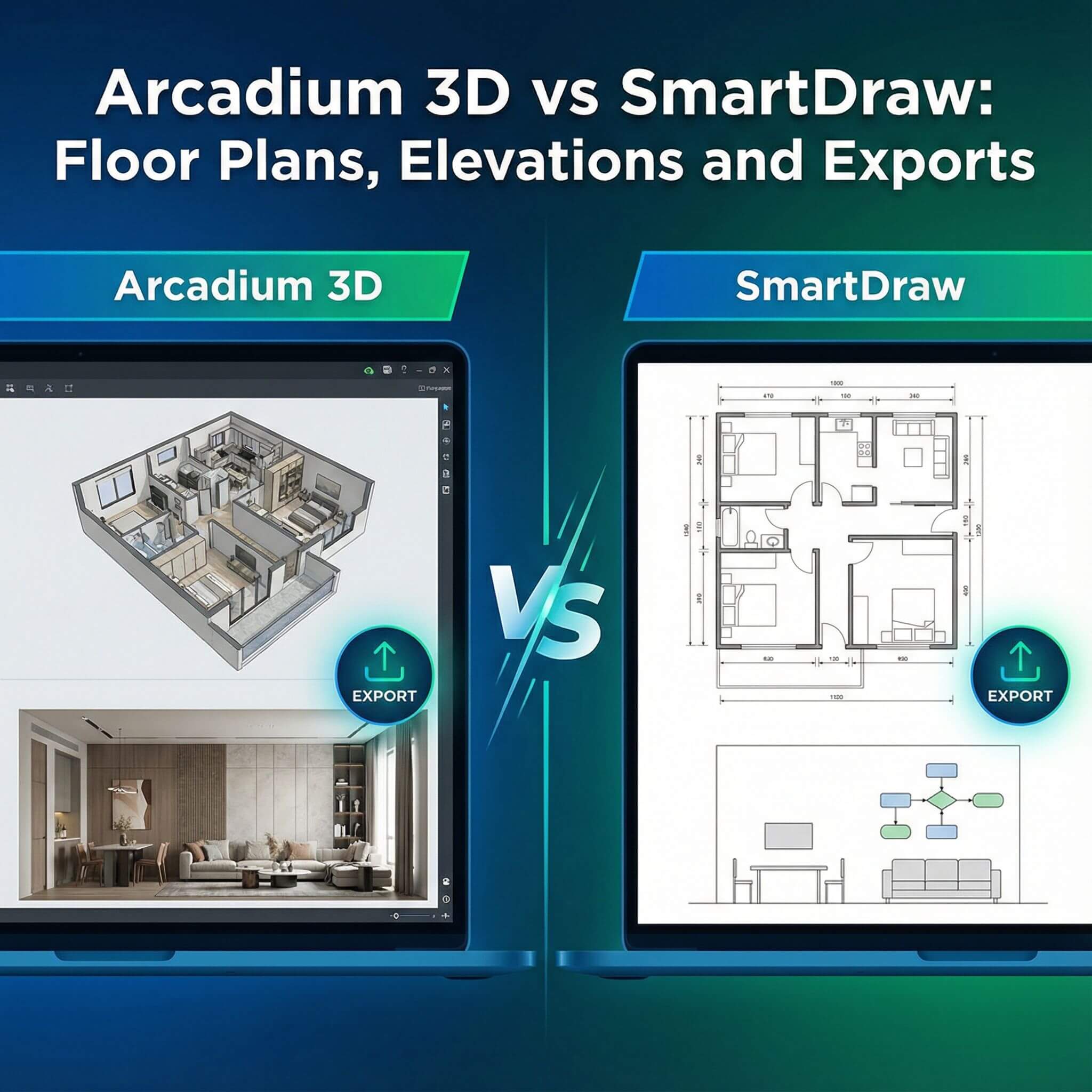
Arcadium 3D and SmartDraw are both powerful design tools for architects and interior designers, but they take very different approaches. Arcadium 3D is a free, browser-based 3D home design app (no downloads needed) that emphasizes quick floor plan creation and instant 3D visualization.
SmartDraw, by contrast, is a mature diagramming suite (desktop/web) with detailed 2D floor plan and elevation tools, used in many industries.
Your Quick Guide to Making the Right Choice
Floor Plan Creation
Arcadium 3D:
Arcadium’s floor plan tools are designed to be intuitive and fast. It runs entirely in a browser with gaming-style controls, so you simply click-and-drag walls, and dimensions snap in automatically.
You can switch seamlessly between 2D and 3D views, adding rooms, doors and windows easily. All objects (furniture, appliances, lighting) come from its built-in 3D library, and parameters adjust in real time.
Because it’s free and web-based, Arcadium is highly accessible – you can work on any computer or tablet without installing software. As a result, layouting a space feels fast and fluid: it’s “as easy as Minecraft” to build walls and fill a room.
SmartDraw:
SmartDraw’s floor plan features are geared toward precision and detail. It provides hundreds of professional templates and symbol libraries (rooms, offices, kitchens, etc.) for quick starts. You add walls by clicking or dragging and can type exact dimensions for accuracy.
SmartDraw supports architectural scales and even lets you switch scale at any time or print to scale. Complex plans can use layers (e.g. electrical, plumbing, HVAC) to manage systems separately. The software integrates with Office and cloud storage, so you can save plans directly to SharePoint or Drive and drop them into Word or PowerPoint.
Which is better?
Arcadium excels at rapid, intuitive plan sketching and instant 3D visualization, making it ideal for brainstorming room layouts on the fly. SmartDraw is stronger for technical drafting – if you need exact measurements, multiple layers, or CAD-style control, its floor plan tools are more robust.
For most architects or designers wanting a quick, free tool, Arcadium’s simple interface wins. For enterprise teams needing advanced annotation or integration with other apps, SmartDraw may have the edge.
Elevation and Section Views
Arcadium 3D:
One of Arcadium’s standout features is automatic elevation and section generation. From your floor plan, Arcadium can instantly produce orthographic views (e.g. wall elevations and cross-sections) as shown in its feature list. You can also take a first-person walkthrough of the 3D model to see spaces from any angle.
This makes it easy to verify heights, alignments, and sightlines: for example, you can adjust a wall height or window placement and immediately see the elevation change in 3D. Because it’s all model-based, any change in the plan updates the elevations and 3D view automatically.
SmartDraw:
SmartDraw provides dedicated elevation drawing tools and a huge symbol library for designing elevations. You can pick from templates like “house elevations,” kitchen or living room elevations, or cabinet layouts. Thousands of 2D graphics (windows, doors, furniture, roofing, etc.) are available.
You drag and drop shapes onto your elevation and can resize them simply by typing in new dimensions. SmartDraw also includes textures for walls and surfaces, giving elevations a more realistic look. Unlike Arcadium’s auto-generated views, SmartDraw’s approach is manual but highly customizable.
Which is better?
For speed and visualization, Arcadium’s auto-generated elevations are a clear win – you get instant cross-sections without redrawing anything. SmartDraw shines when you need fine control: its vast palette of elevation symbols and templates supports detailed technical drawings.
In practice, Arcadium is great for quickly understanding height relationships in a design, while SmartDraw is preferred if you need polished, print-ready elevation drawings.
Exporting and Sharing Designs
Arcadium 3D:
Arcadium does not output static files by default, but it offers an innovative sharing workflow. You can share any design via a URL, and recipients can view and even navigate the project in 3D from their browser.
This live sharing link lets clients or team members take a virtual walkthrough, toggle floor plan/elevation views, and explore cross-sections – all without installing software.
Arcadium’s online nature means designs are saved in the cloud, and everyone sees the latest version in real time. (Arcadium does have image snapshots if needed, but its focus is on interactive web sharing.)
SmartDraw:
SmartDraw provides traditional export options. You can export your floor plans or elevations to many file formats: Visio (VSDX), PDF, SVG, PNG, JPEG, or even copy diagrams into Office apps. Exports generate print-ready files in your Downloads folder.
SmartDraw also saves to cloud storage (OneDrive, Dropbox, etc.) and lets you share a viewable link (guests can view a diagram online). However, these exports are all 2D images or documents – there is no 3D model or walkthrough.
Which is better?
If you need an interactive presentation, Arcadium’s link-sharing is unmatched. Clients can “walk” through the space and see changes live. If you require standard documentation or collaboration in typical office workflows, SmartDraw’s exports to PDF/PNG and Office integration are more conventional. In summary, Arcadium revolutionizes sharing by using web links for immersive review, while SmartDraw covers all the usual export formats for drawings.
Additional Features & Usability
3D Visualization:
Arcadium 3D is built for immersive design. It uses an “instant rendering engine” and adjustable lighting for realistic 3D views. You can insert lights (lamps, chandeliers) and even take VR-style walks through the model. SmartDraw, however, has no real 3D rendering – it’s purely 2D. (TechRadar notes SmartDraw “doesn’t have 3D modeling capabilities”.)
Content Libraries:
Arcadium comes with a large parametric furniture library and pre-built kitchen units, updated automatically. It even supports custom objects made from shapes. SmartDraw relies on 2D symbol libraries (furniture, equipment, floor tiles, etc.) and has recently added over 300 new elevation symbols. Both tools cover most common architecture objects, but Arcadium’s are 3D models, while SmartDraw’s are 2D graphics.
Ease of Use:
Arcadium emphasizes simplicity. Its interface feels like a 3D game, so new users can often pick it up without training. SmartDraw is relatively intuitive for a drafting tool, but its depth of options can present a steeper learning curve, especially for 3D novices. Onboarding a team in SmartDraw may require more training.
Collaboration:
Both tools let you collaborate. Arcadium shares live editable projects via URL (viewers can join as “editors” or just explore as guests). SmartDraw allows real-time co-editing and commenting (in Teams, Confluence, etc.) and sharing through links or common cloud drives.
Pricing and Accessibility
Arcadium 3D:
Completely free to start (no credit card, no downloads) with unlimited projects. There are optional paid upgrades for advanced features (e.g. extra AI tools), but the core 3D planner is free. Because it is browser-based, you can run Arcadium on Windows, Mac, or tablets without installation.
SmartDraw:
Paid software. SmartDraw offers a 7-day free trial, but after that you must subscribe. Pricing starts around $9.95 per month for a single user (billed annually). It has both an online version and a Windows desktop version (the PC edition is a one-time ~$297 purchase). SmartDraw is widely used by businesses (even 85% of the Fortune 500), but it is not free.
Which is better?
For users on a budget or who need instant access, Arcadium’s zero-cost, no-install approach is a major advantage. SmartDraw’s price may be worthwhile for large teams or specialized industry use. In terms of accessibility, Arcadium’s browser-based model (including mobile/tablet support) can be a game-changer in the field.
Conclusion
In summary, Arcadium 3D and SmartDraw serve similar audiences but in different ways. Arcadium offers a modern, free, and immersive approach to home design – think fast 3D modeling with instant visualization. SmartDraw provides a traditional, detail-focused drafting experience with extensive 2D tools and export options.
For architects and interior designers, Arcadium is an appealing alternative to SmartDraw when you want to create or showcase spaces quickly and intuitively. It systemically promotes efficiency (no downloads, AI help, 3D preview) without cost. SmartDraw may still be the choice if you need heavy-duty technical drawings or integration with legacy office workflows.
Ultimately, Arcadium 3D stands out as a competitive alternative for floor plans, elevations, and sharing designs, especially for users seeking simplicity and 3D interactivity.
Frequently Asked Questions
Is Arcadium 3D free to use?
Yes. Arcadium 3D’s core floor plan and 3D design tools are completely free (browser-based). There are optional paid add-ons, but you can start designing at no cost.
Does SmartDraw support 3D modeling?
No. SmartDraw is a 2D design and diagramming tool; it does not create true 3D models or walkthroughs. It focuses on scaled floor plans and elevations instead.
What export options does Arcadium 3D offer?
Arcadium lets you share your project via a web link. Viewers can then explore the 3D model, elevations, and floor plans online. It does not natively export to CAD or image files, but you can take screenshots or exports of the shared view if needed.
Can SmartDraw export diagrams to other formats?
Yes. SmartDraw can export any drawing to PDF, PNG, JPEG, SVG or even Visio’s VSDX format. You can also copy diagrams into Office apps directly. This makes SmartDraw strong for creating print-ready documents.
Does Arcadium 3D require software installation?
No. Arcadium 3D works 100% in your web browser. You simply open the site and start designing on any device (desktop, laptop, tablet) without downloads.
Is Arcadium good for professional use?
Yes. Although Arcadium is free and easy, it is built for professional designers too. It offers precise dimensioning, parametric components, and photo-realistic renders. Many architects and designers trust Arcadium for concept layouts and client presentations.
Which tool is easier for beginners?
Arcadium 3D is generally easier for beginners due to its intuitive, game-like interface. You can start creating in minutes with minimal learning. SmartDraw has more features and customization, which can be powerful but may require a learning period to master.
You can check our other comparison contents:
Arcadium 3D vs RoomSketcher: Floor Plans to First-Person Tours
Arcadium 3D vs Homestyler: Browser Performance With Large Rooms
Arcadium 3D vs Floorplanner: Sharing Links and Client Walkthroughs
Arcadium 3D vs Cedreo: DIY Speed versus Professional Design Outputs
Arcadium 3D vs HomeByMe: Which Platform Balances Speed, Control, and Visual Power Best
Arcadium 3D vs Sweet Home 3D: Which Design Platform Delivers Speed, Flexibility, and Visual Impact
Arcadium 3D vs SketchUp: Which Design Tool Fits Your Workflow?
Arcadium 3D vs Roomstyler: Choosing the Right Tool for Speed, Precision, and Creative Freedom
Arcadium 3D vs Planner 5D: Which Design Platform Delivers More for Modern Creators



 Color palette generator
 Floor plan creator
 Kitchen design tool
 House design software
 Landscape design software
 Bedroom design
 Office floor plan creator
 Trade show booth design
 How to use Arcadium — full guide
 Community Showcase
 3D object library - free
 Articles and blog